GA4 and Adobe Analytics start from opposite ends. Put the Google tag on a page and GA4 records page views, sessions and engagement straight away; switch on Enhanced Measurement and it adds outbound clicks, file downloads, site search, scroll depth, form interactions and YouTube video events. Install Adobe Experience Platform Tags with the Adobe Analytics extension, or with the Web SDK, and nothing reaches a report suite until a rule sends a beacon or calls sendEvent. Once that first page view arrives, Adobe fills in a long list of dimensions and metrics by itself, and a few settings add link tracking.
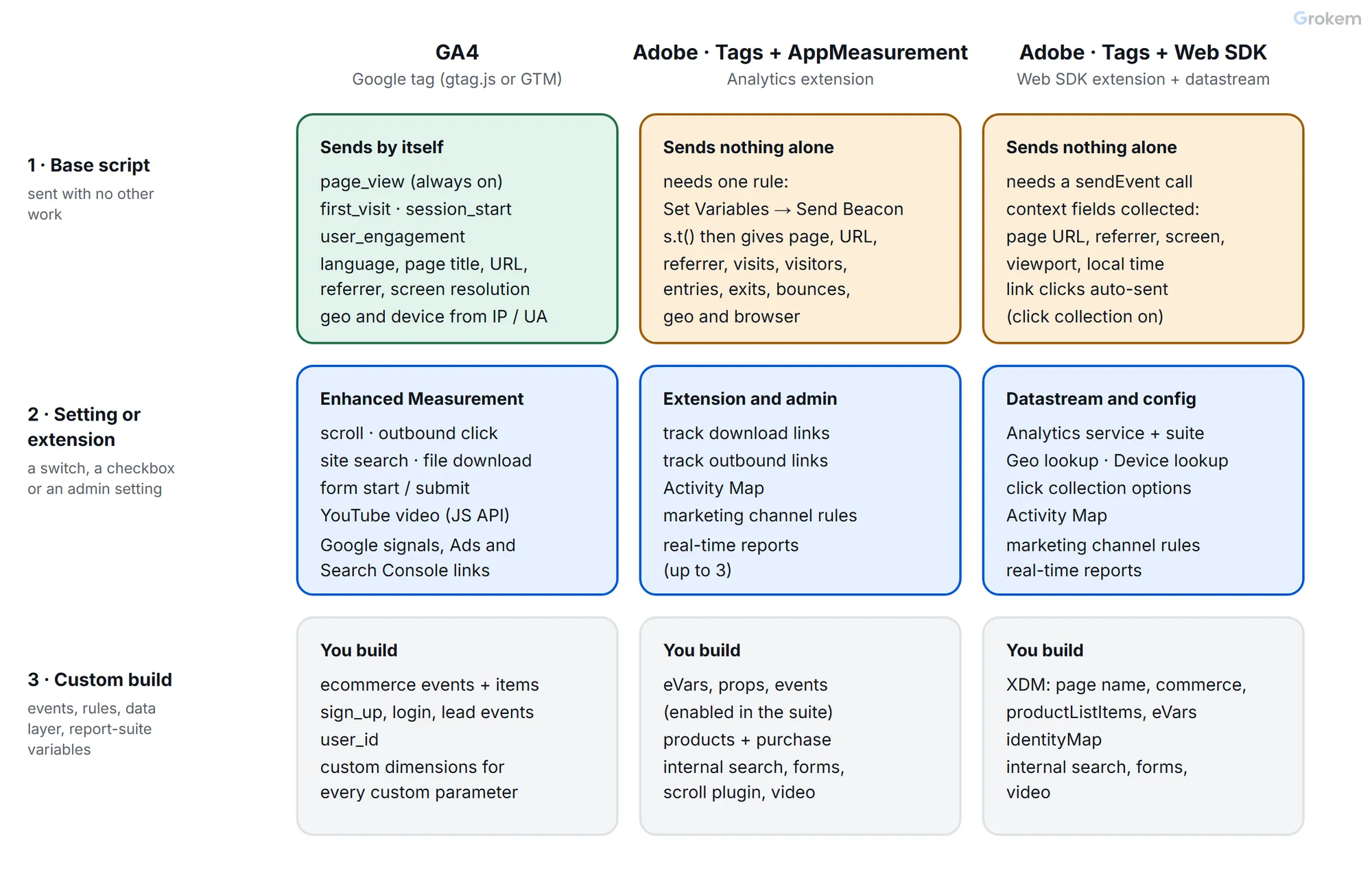
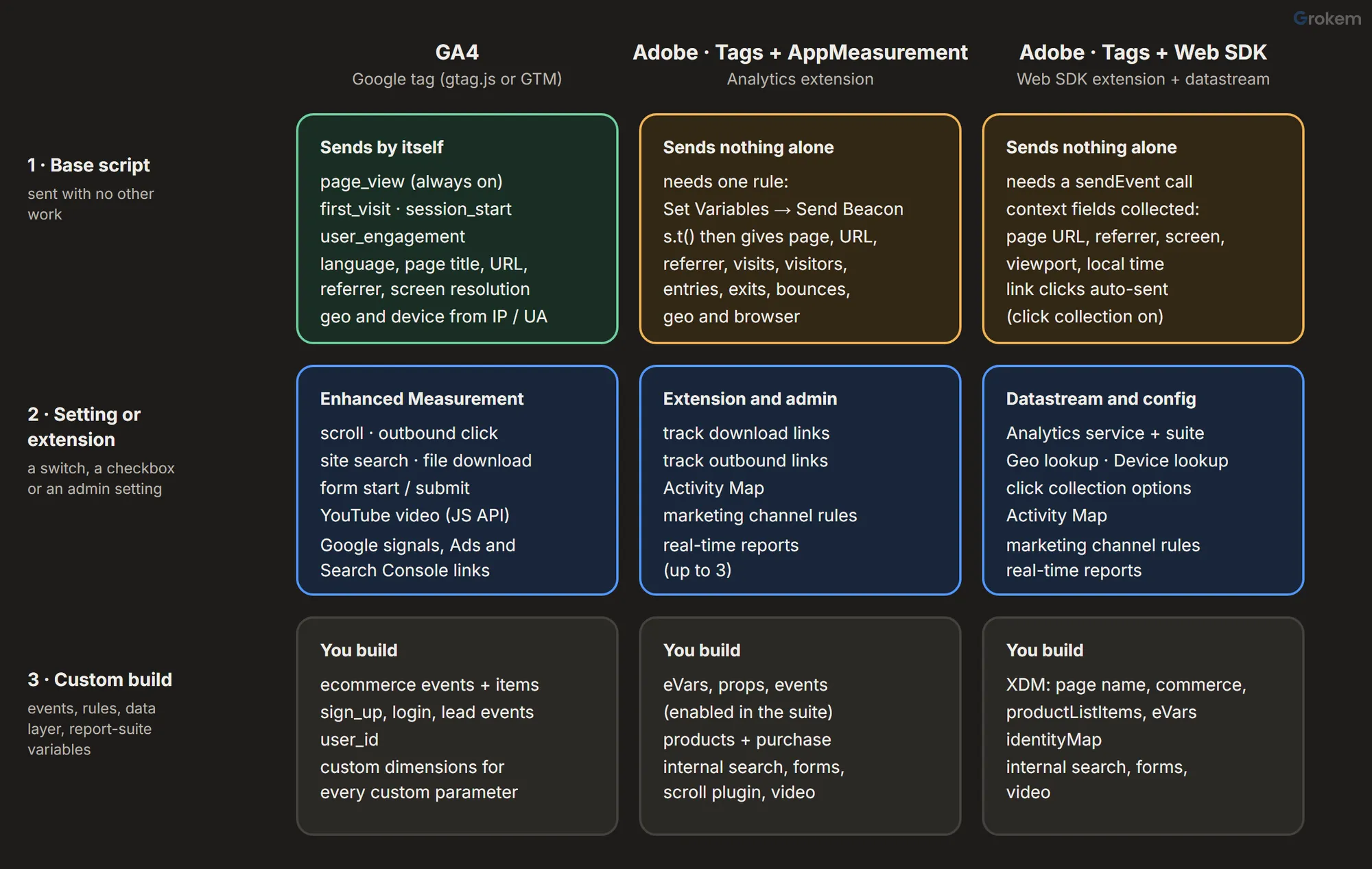
This guide sorts what each tool collects into three layers:
- Base script – what arrives with the standard install and nothing else.
- Setting or extension – what a switch in the admin, a checkbox in an extension or a datastream option turns on.
- Custom implementation – what needs events, rules, a data layer or JavaScript, in Google Tag Manager or in Adobe Tags.
For each item it says where the data appears in reports and how soon. A side-by-side table and a worked shop example close the guide.
What "only the base script" means in each tool
| Setup | The base install | What sends the first hit |
|---|---|---|
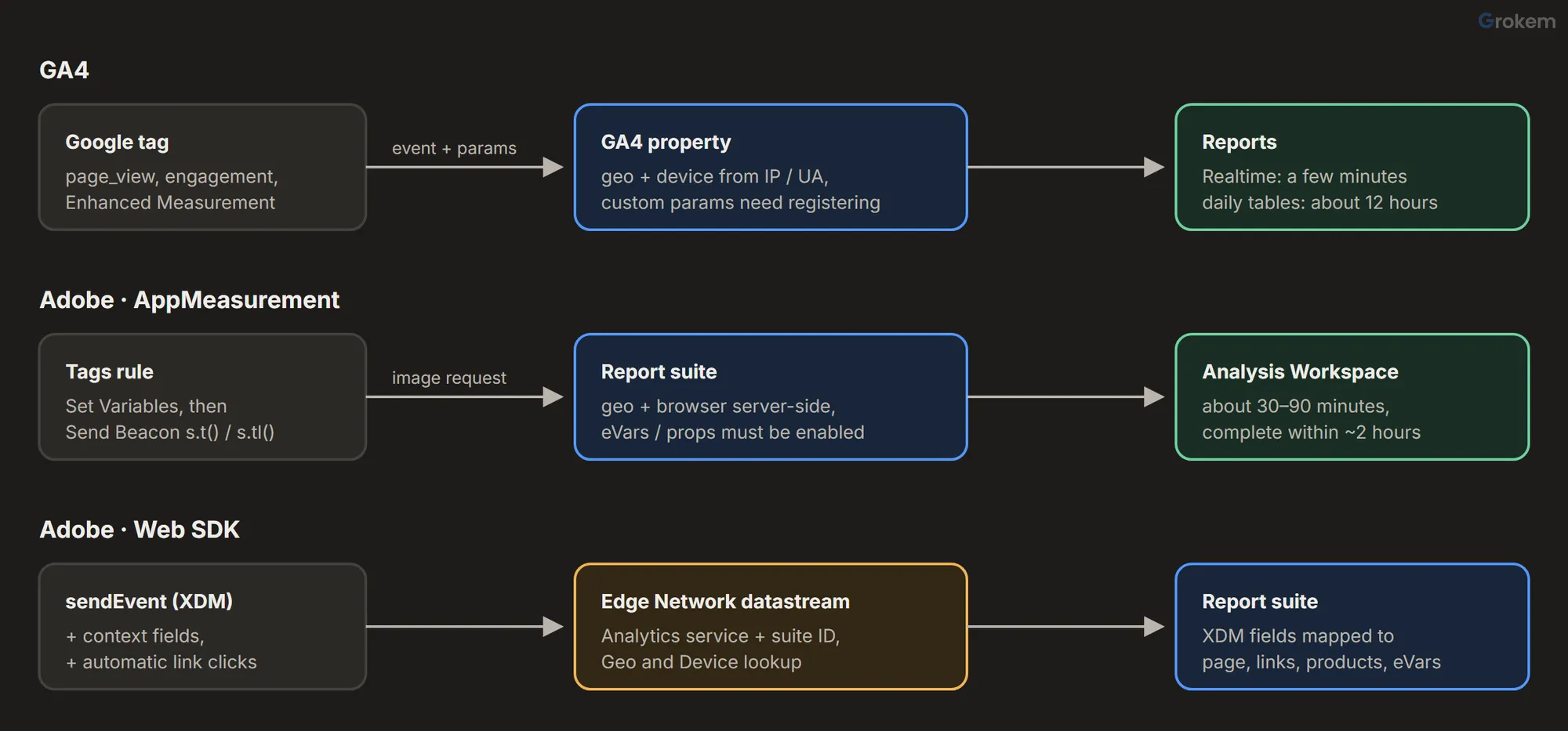
| GA4 | The Google tag (gtag.js), or a Google tag in Google Tag Manager, with the measurement ID of a web data stream | The tag itself: it sends page_view when the page loads |
| Adobe Analytics with AppMeasurement | The Tags embed code and the Adobe Analytics extension, which loads AppMeasurement and names a report suite per environment | A Tags rule with the Set Variables and Send Beacon actions: s.t() counts a page view, s.tl() sends a link call that does not |
| Adobe Analytics with the Web SDK | The Tags embed code and the Web SDK extension, plus a datastream that has the Adobe Analytics service and a report suite ID | A sendEvent call, usually the Send event action of a Tags rule |
For Adobe, "base script" in this guide therefore means the extension plus the one page-view rule (or sendEvent) that every implementation starts with. Without it, AppMeasurement loads and sends nothing. The Web SDK is the one exception in Adobe's stack: with click collection on, which is its default, link clicks are collected without any rule.
GA4
Layer 1: what the Google tag sends by itself
| Event | When it fires | Main parameters |
|---|---|---|
page_view |
Each page load, and each browser-history change made by the site (single-page apps) | page_location, page_referrer, engagement_time_msec |
first_visit |
The first time a user visits the site | client_id, ga_session_id, ga_session_number, page_location, page_referrer, page_title |
session_start |
When a user engages with the site | the same session parameters as first_visit |
user_engagement |
When the page has been in focus for at least one second | engagement_time_msec |
Google lists page_view among the Enhanced Measurement events, but its collection cannot be turned off; only the history-change part has its own switch. Every event also carries five parameters: language, page_location, page_referrer, page_title and screen_resolution.
From these events GA4 fills, with no further setup:
- Geography – country, region and city, from the IP address.
- Platform and device – device category, browser and operating system.
- Page – page location, page title and landing page.
- Time – date, hour, month and year.
- Traffic source – source and medium from the referrer, or from
utm_parameters on the landing URL when they are present. - Users and sessions – users, new users, sessions, engaged sessions, engagement rate, bounce rate, views and engagement time.
An engaged session lasts longer than 10 seconds, has a key event, or has two or more page views. Bounce rate in GA4 is simply the share of sessions that were not engaged, which is a different measure from Adobe's single-hit bounce described below.
Layer 2: settings that switch more on
Enhanced Measurement lives under Admin > Data streams > your web stream. Turning on its main switch turns on all of its options; each one can then be switched off on its own.
| Option | Event | Fires when | Parameters | Watch out for |
|---|---|---|---|---|
| Scrolls | scroll |
90 % of the page height first becomes visible, once per page | engagement_time_msec |
One threshold only; 25 %, 50 % or 75 % need a custom trigger |
| Outbound clicks | click |
A link leads to another domain | link_classes, link_domain, link_id, link_url, outbound |
Domains in your cross-domain setup do not count as outbound |
| Site search | view_search_results |
A page loads with a search query parameter | search_term |
Looks for q, s, search, query and keyword; add your own in advanced settings |
| Form interactions | form_start, form_submit |
First interaction with a form in a session; a submit | form_id, form_name, form_destination, form_submit_text |
The parameters appear in reports only after you register them as custom dimensions; test that form_submit matches real submissions |
| Video engagement | video_start, video_progress, video_complete |
An embedded YouTube video starts, passes 10, 25, 50 and 75 %, ends | video_current_time, video_duration, video_percent, video_provider, video_title, video_url, visible |
Only YouTube embeds with JavaScript API support (enablejsapi=1 on the embed) |
| File downloads | file_download |
A link points to a file with a common extension (pdf, xlsx, docx, zip, mp4, mp3 and others) | file_extension, file_name, link_text, link_url |
Files served without an extension in the URL are missed |
Other settings that add data without code:
- Google signals populates the demographics dimensions (age, gender, interests). Google applies data thresholds to reports that use them, so small segments can be withheld.
- Google Ads link fills the Google Ads campaign, ad group and customer dimensions.
- Search Console link adds two reports, Google organic search queries and Google organic search traffic. Their report collection is unpublished by default: publish it from the Library.
- Session timeout and engaged-session timer default to 30 minutes and 10 seconds; both are adjustable in the Google tag settings.
- Data retention is 2 or 14 months for standard properties. It affects explorations and funnel reports only, not the standard reports.
Layer 3: what you have to build
- Ecommerce. GA4 defines the events but you send them:
view_item_list,select_item,view_item,add_to_cart,add_to_wishlist,view_cart,remove_from_cart,begin_checkout,add_shipping_info,add_payment_info,purchase,refund,view_promotionandselect_promotion. Apurchaseneeds atransaction_id; each item needs anitem_idor anitem_name; sendcurrencywhenever you sendvalue. - Leads and accounts. Recommended events such as
sign_up,loginandgenerate_leadare sent by your code or by Tag Manager triggers. - Signed-in users.
user_idis set in the tag configuration, or withgtag('set', {user_id: …})after a login; sendnullwhen the user signs out. - Anything else – button clicks that are not outbound links, internal promotions, error messages, product attributes – is a custom event with custom parameters. A parameter shows in reports only once registered as a custom dimension or metric (standard properties: 50 event-scoped and 25 user-scoped dimensions, 10 item-scoped dimensions, 50 custom metrics), and data appears 24–48 hours after you create it.
Adobe Analytics
Layer 1: what the page-view call gives you
With AppMeasurement, the first s.t() call fills, with no variables set:
- Page – the page name, which falls back to the page URL when
pageNameis not set (truncated to 100 bytes either way), and Page URL. - Referrer and Referring domain.
- Geography – derived server-side from the visitor's IP address.
- Technology – browser and operating system, derived server-side from the user agent; monitor resolution and browser width and height.
- Visits, unique visitors, page views, entries, exits, time spent and bounces. A bounce in Adobe is a visit with exactly one hit, so a page view followed by an automatic exit-link call is not a bounce.
Visitors are identified by the first identifier available: a custom visitorID, the legacy s_vi cookie, the Experience Cloud ID (ECID, set by the Experience Cloud ID Service or by the Web SDK), a fallback ID AppMeasurement generates, and finally IP address plus user agent. Adobe recommends ECID wherever possible.
With the Web SDK, every sendEvent carries context fields collected automatically:
| Context | XDM fields | Appears in Analytics as |
|---|---|---|
| web | web.webPageDetails.URL, web.webReferrer.URL |
Page URL, Referrer |
| device | device.screenWidth, device.screenHeight, device.screenOrientation |
Monitor resolution |
| environment | environment.browserDetails.viewportWidth, viewportHeight |
Browser width, Browser height |
| placeContext | placeContext.localTime, localTimezoneOffset, ianaTimezone |
Local time (in data feeds) |
| timestamp | timestamp |
Hit time (always sent) |
Adobe counts a Web SDK event as a page view when it carries a page name or URL and no web.webInteraction.type; with webInteraction.type it is a link call; with neither, the Edge Network drops it. Set web.webPageDetails.name yourself, because that field is the Page dimension.
Click collection is on by default in the Web SDK. It records clicks on <a> and <area> elements as internal, exit or download links and fills the Custom link, Exit link and Download link dimensions.
Layer 2: extension, admin and datastream settings
- Link tracking in the Analytics extension. Track download links (with the list of file extensions it watches), Track outbound links (exit links, judged against your internal-domain filters) and Keep URL parameters. Adobe's documentation does not state their defaults, so open the extension and check them.
- Activity Map reports link clicks by page region, with an overlay on the page. Enable it in the report suite settings – once enabled it cannot be turned off – then use the Activity Map setting of the Analytics extension (version 1.9.0 or later) or the click data collection of the Web SDK extension (2.23 or later). It adds the Activity Map Link, Region, Page and Link By Region dimensions.
- Marketing channels are not filled until you create channels and their processing rules. If none exist yet, an automatic setup offers pre-configured channels with rules to start from. Rules apply to data processed after they are saved.
- Real-time reports must be configured in the report suite: up to three reports, each with one metric and up to three dimensions.
- Datastream (Web SDK only). Add the Adobe Analytics service with your report suite ID. Adobe's dimension documentation says to enable Geo Lookup and Device Lookup in the datastream for the geography and browser dimensions to be filled from Web SDK data; with no Geo Lookup option selected, geolocation lookups are off, and the default device setting keeps the user-agent and client-hint headers instead of running the lookup.
- Click collection options (Web SDK). Internal, exit and download links can each be switched off;
eventGroupingEnabled(off by default) holds internal-link data until the next page view to send fewer events;filterClickDetailscan change or drop link data before it is sent. - More context (Web SDK). High-entropy user-agent hints and the one-time Analytics referrer are collected only if you add them to the
contextsetting.
Layer 3: what you have to build
- Custom variables. eVars (conversion variables) and props (traffic variables) must be enabled in the report suite – eVars with an allocation and an expiration – and success events configured, before a rule sets them. In the Web SDK, eVars map from
_experience.analytics.customDimensions.eVars.eVar1toeVar250, or from your own XDM fields through a mapping. - Commerce. Set
events(prodView,scAdd,scCheckout,purchase) with theproductsstring –category;product;quantity;price, where price is the total for the quantity – and apurchaseIDof up to 20 letters and digits. In the Web SDK the same data goes incommerce(productViews,productListAdds,checkouts,purchases),commerce.order.purchaseID,commerce.order.currencyCodeandproductListItems(SKU,name,quantity,priceTotal). - Page names, site sections and campaign codes.
pageName(orweb.webPageDetails.name),channel(web.webPageDetails.siteSection) and the tracking code (campaign, ormarketing.trackingCode) come from your data layer or a query-string data element. Adobe does not readutm_parameters into Tracking Code by itself. - Internal search, form steps and errors – an eVar for the value and a success event to count it, set by a rule.
- Scroll depth. The
getPercentPageViewedplugin (Common Analytics Plugins extension) records how far a visitor scrolled the previous page; you copy its values into an eVar or prop on the next page. Adobe states the plugin is not yet supported with the Web SDK. - Video. Adobe measures video with Adobe Streaming Media, a separate product with its own implementation; there is no automatic YouTube tracking.
- Signed-in users. A custom
visitorIDwith AppMeasurement, or your own identifier inidentityMapwith the Web SDK.
When the data shows up in reports
| GA4 | Adobe Analytics | |
|---|---|---|
| First look | Realtime report, typically within a few minutes | Real-time reports, once configured |
| Standard reports | Intraday tables in 2–6 hours; daily tables in about 12 hours for normal-sized properties, later for large ones | Hourly batches: about 30–90 minutes, complete typically 2 hours after collection |
| New custom field | 24–48 hours after you register the custom dimension or metric | Once the eVar, prop or event is enabled and a rule sets it |
| Restrictions | Data thresholds on demographics and Google signals data; retention setting limits explorations | Rules (processing, marketing channels) apply to data processed after they are saved |
Side by side
Base = with the standard install only (for Adobe: plus the page-view call). Setting = a switch, checkbox or datastream option. Custom = events, rules or code you write.
| Data point | GA4 | Adobe with AppMeasurement | Adobe with Web SDK |
|---|---|---|---|
| Page views | Base: page_view, including history changes |
Base: the page-view rule's s.t() |
Base: sendEvent with a page name or URL |
| Page name | Base: page title | Custom: pageName (falls back to the URL) |
Custom: web.webPageDetails.name |
| Page URL and referrer | Base | Base | Base (web context) |
| Sessions or visits | Base: session_start |
Base: Visits | Base: Visits |
| Users or visitors | Base: client ID | Base: visitor ID (ECID recommended) | Base: ECID |
| Engagement and bounce | Base: engaged sessions; bounce = not engaged | Base: time spent; bounce = single-hit visit | Base: same as AppMeasurement |
| Country, region, city | Base | Base | Setting: Geo Lookup in the datastream |
| Browser, OS, device | Base | Base | Setting: Device Lookup in the datastream |
| Screen and viewport | Base: screen_resolution |
Base: monitor resolution, browser size | Base: device and environment context |
| Source and medium | Base: referrer and utm_ tags |
Base: referrer and referring domain | Base: referrer and referring domain |
| Marketing channels | Base: default channel groups | Setting: channels and processing rules | Setting: channels and processing rules |
| Campaign tracking codes | Base: utm_ parameters |
Custom: campaign from the URL |
Custom: marketing.trackingCode |
| Exit (outbound) link clicks | Setting: Enhanced Measurement | Setting: Track outbound links | Base: click collection |
| File downloads | Setting: Enhanced Measurement | Setting: Track download links | Base: click collection |
| Internal link clicks | Custom | Setting: Activity Map | Base: click collection; Setting: Activity Map |
| Click map on the page | Not available | Setting: Activity Map | Setting: Activity Map |
| Site search | Setting: Enhanced Measurement (query parameter) | Custom: eVar and event | Custom: XDM field and mapping |
| Scroll depth | Setting: 90 % only | Custom: getPercentPageViewed plugin |
Custom (the plugin is not supported) |
| Form interactions | Setting: form_start, form_submit |
Custom | Custom |
| Video | Setting: YouTube with JS API | Custom: Adobe Streaming Media | Custom: Adobe Streaming Media |
| Ecommerce | Custom: recommended events and items |
Custom: events and products |
Custom: commerce and productListItems |
| Sign-ups, logins, leads | Custom: recommended events | Custom: success events | Custom: XDM and mapping |
| Signed-in user ID | Custom: user_id |
Custom: visitorID |
Custom: identityMap |
| Your own attributes | Custom: parameters plus custom dimensions | Custom: eVars and props enabled in the suite | Custom: XDM fields mapped to eVars |
| Demographics | Setting: Google signals | No built-in equivalent | No built-in equivalent |
| Google Ads and Search Console data | Setting: product links | Not built in | Not built in |
| Real-time view | Base: Realtime report | Setting: real-time reports | Setting: real-time reports |
Worked example: a small online shop
The site has product pages and a checkout, a blog, a help centre whose search results live at /help/search?q=…, a PDF price list, YouTube how-to videos embedded on product pages and a contact form.
Day one, standard install only.
- GA4: page views on every page, sessions, users, engagement, country and device, source and medium for every visit. With Enhanced Measurement on, it also records the price-list downloads, help-centre searches (the
qparameter is in the default list), clicks to the shop's social profiles, 90 % scrolls on blog posts and contact-form starts and submits. The YouTube videos are tracked only if their embed code includesenablejsapi=1. - Adobe with AppMeasurement: after the page-view rule, page views, visits, unique visitors, entries, exits, time spent, bounces, country and browser. Pages appear under their URLs until a page name is set.
- Adobe with the Web SDK: the same visit and page metrics once
sendEventruns on each page, plus every link click, download and exit through click collection. Country and browser stay empty until Geo Lookup and Device Lookup are enabled in the datastream.
One hour of settings.
- GA4: register
form_idandform_nameas custom dimensions so the contact form shows by name (the search term needs no registering: Search term is a built-in dimension), link Search Console and publish its reports, add the help centre's own search parameter if it is notq, and decide on Google signals. - Adobe: tick download and exit link tracking (AppMeasurement), enable Activity Map, run the marketing channels automatic setup and review its rules, configure a real-time report, and enable Geo and Device Lookup (Web SDK).
What still needs building in both tools. The checkout funnel and the purchase, the help-centre search in Adobe, the contact form in Adobe, scroll depth beyond 90 % in GA4 (and at all in Adobe), video in Adobe, and a user ID for signed-in customers. The purchase of two bottles at 24.00 each looks like this.
GA4, sent on the confirmation page (or by a Tag Manager tag reading the same values from the data layer):
gtag("event", "purchase", {
  transaction_id: "ORD88213",
  value: 48.00,
  currency: "EUR",
  items: [
    { item_id: "SKU-1042", item_name: "Steel water bottle", price: 24.00, quantity: 2 }
  ]
});
Adobe with AppMeasurement, set in the confirmation-page rule before its Send Beacon (s.t()):
s.pageName = "checkout:confirmation";
s.events = "purchase";
s.products = ";SKU-1042;2;48.00";
s.purchaseID = "ORD88213";
s.currencyCode = "EUR";
Adobe with the Web SDK, the XDM object of the Send event action (shown here as the equivalent library call):
alloy("sendEvent", {
  xdm: {
    web: { webPageDetails: { name: "checkout:confirmation" } },
    commerce: {
      purchases: { value: 1 },
      order: { purchaseID: "ORD88213", currencyCode: "EUR" }
    },
    productListItems: [
      { SKU: "SKU-1042", name: "Steel water bottle", quantity: 2, priceTotal: 48.00 }
    ]
  }
});
Note the difference in price: GA4's price is per item, while Adobe's products price and the Web SDK's priceTotal are the total for the quantity. Getting that wrong doubles or halves revenue in one tool and not the other, and it is an easy reason for the two to report different totals for the same orders.
Checked against Google's and Adobe's documentation on 2 November 2026.
Google Analytics is a trademark of Google LLC. Adobe, Adobe Analytics and Adobe Experience Platform are either registered trademarks or trademarks of Adobe in the United States and/or other countries. Grokem is not affiliated with or endorsed by Google or Adobe.
What we compared
- What the base script sends by itself
- What a setting, extension or datastream option adds
- What needs custom implementation
- When the data reaches reports
Recommendation
Choose GA4 when you need useful numbers on day one with no engineering time: the base tag and Enhanced Measurement cover page views, engagement, outbound clicks, downloads, site search, 90 % scroll, forms and YouTube video without a single custom event. Choose Adobe Analytics when you are ready to design the data you collect: almost every business-specific value is an eVar, prop or event you plan, enable and set by rule, and its reports (attribution, Activity Map, classifications) reward that design. Whichever you run, plan ecommerce, sign-ups and user IDs as custom work in both, and keep one rule in mind when you compare their totals: GA4 item prices are per unit, Adobe product prices are per line.
Caveats
- Both tools change their defaults; this comparison was checked against the documentation on 2 November 2026.
- Adobe does not document the defaults of the Analytics extension's download and outbound link checkboxes: open the extension and check them.
- Test that GA4's form_submit matches real submissions before you treat it as a conversion.
- Demographics in GA4 depend on Google signals and are subject to data thresholds.
- The getPercentPageViewed scroll plug-in does not support the Web SDK.
Frequently asked questions
Does GA4 track button clicks automatically?
Only two kinds of click: links to another domain (the outbound click event) and links to files with a common extension (file_download), both through Enhanced Measurement. Clicks on buttons, tabs or internal links need a custom event, sent by your code or by a Google Tag Manager click trigger.
Does Adobe Analytics count page views without a rule?
No. AppMeasurement sends a hit only when a rule or your code calls s.t() (a page view) or s.tl() (a link call), and the Web SDK only when sendEvent runs. The one thing the Web SDK sends without a rule is link clicks, through click collection, which is on by default.
Why are country and browser empty in my Web SDK data?
Adobe derives them on its servers, and for Web SDK data that happens in the datastream. Adobe's dimension documentation says to enable Geo Lookup and Device Lookup in the datastream; with no Geo Lookup option selected, geolocation lookups are off. AppMeasurement data needs no setting for these dimensions.
Why can't I see form_id or other parameters in GA4 reports?
GA4 collects custom and many Enhanced Measurement parameters but shows them in reports only after you register them as custom dimensions or metrics (Admin > Custom definitions). Data appears 24 to 48 hours after you create the dimension, so register the ones you need before you need them.
Is Enhanced Measurement the same as Adobe Activity Map?
No. Enhanced Measurement sends a handful of events (scroll, outbound click, site search, forms, YouTube video, downloads) into GA4's normal reports. Activity Map reports link clicks by page region and overlays them on the page itself, and needs to be enabled in the report suite. GA4 has no on-page click overlay.
References
- [GA4] Automatically collected events
- [GA4] Enhanced measurement events
- [GA4] Dimensions and metrics
- [GA4] Custom dimensions and metrics
- [GA4] Data freshness
- [GA4] Engaged sessions, engagement rate and bounce rate
- [GA4] Google signals
- Measure ecommerce (gtag.js)
- Send user IDs (gtag.js)
- Adobe Analytics extension overview
- Web SDK: context
- Web SDK: clickCollection
- Page views and link calls with the Web SDK
- XDM object variable mapping to Adobe Analytics
- Configure a datastream
- Visitor identification overview
- Getting started with Activity Map
- Marketing channels: getting started
- getPercentPageViewed plug-in
- Adobe Analytics data latency
From Grokem: https://www.grokem.com/data/data-analytics/web-analytics/ga4-vs-adobe-analytics-out-of-the-box-tracking