Before you start
4- A working Rails application you can run locally
- Basic knowledge of Ruby classes and the Rails console
- Bundler installed, to add gems and run commands with bundle exec
- For the Sidekiq step: a Redis server you can reach (a local install or a hosted add-on)
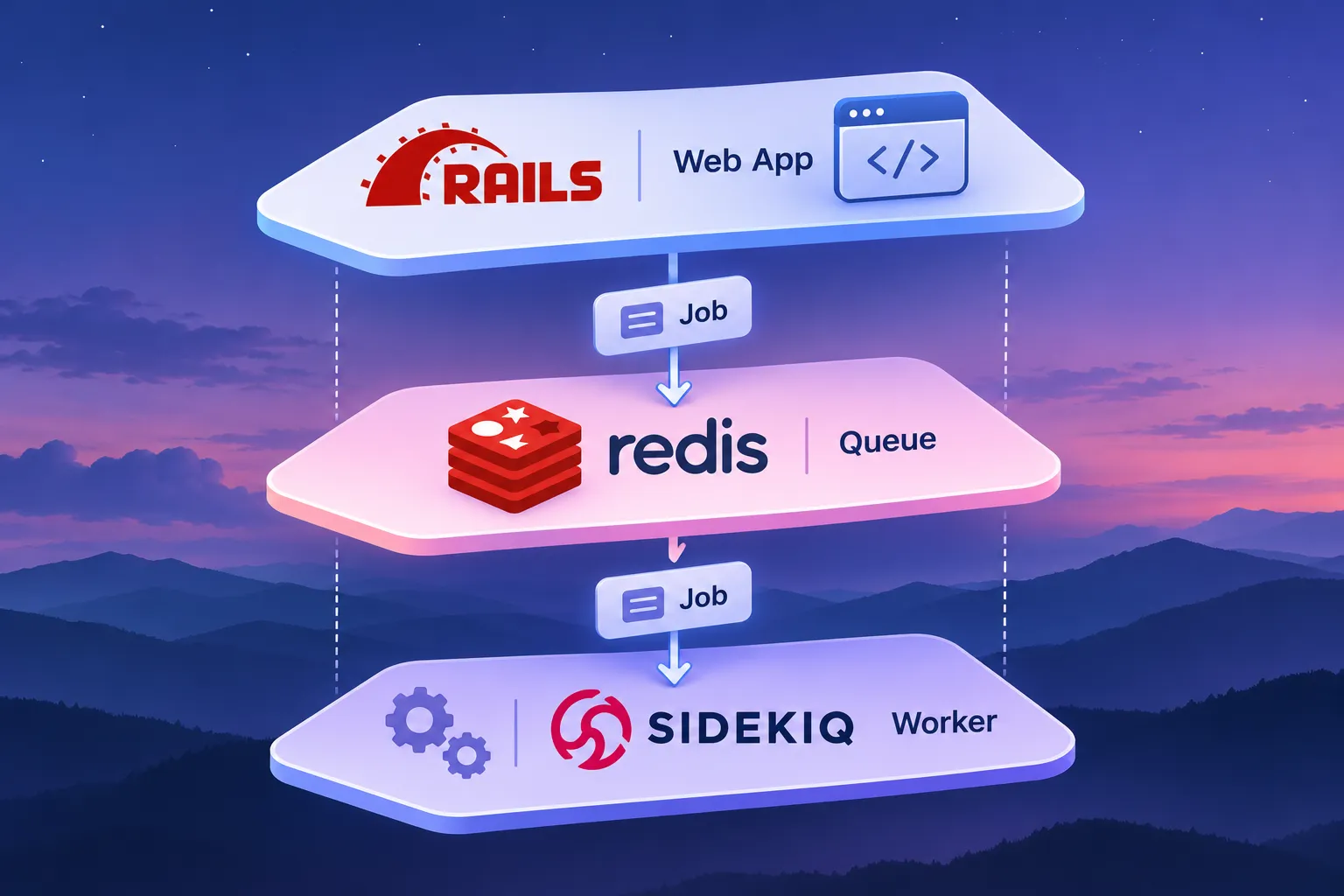
A web request should return fast. When a request also has to send email, clean up records or call a slow service, you move that work out of the request and into a background job. The web process puts a description of the work on a queue. A separate worker picks it up and runs it.
Move work to a job when it matches one or more of these cases:
- The user does not need the result to receive a response.
- The work is slow enough to hold the request open.
- The work should run later, for example in a week or tomorrow at noon.
- The work may fail and you want control over what happens next, such as retrying or discarding it.
Keep work in the request when the response depends on its result.
In Rails you write the job once with Active Job, a wrapper that lets you change the queuing backend later. This guide uses two backends. First you use the in-process one that ships with Rails, so you can learn the job API with no extra services. Then you switch to Sidekiq, which stores jobs in Redis and runs them in a separate worker process.
The in-process queue keeps jobs in memory and runs inside the Rails process. That is fine for learning, but it does not support priority, timeout or retry. Sidekiq is faster than the alternatives described here but requires thread-safe code.
This guide does not cover every Sidekiq option. For anything not shown, such as the contents of config/sidekiq.yml, check the Sidekiq wiki linked in the references.
Step 1 of 11: Choose the work to move out of the request
Pick one action in your app that fits the cases in the overview, such as a welcome email or a cleanup task. Start with one so you can check the full path from request to worker.
The flow you build looks like this: the web process enqueues a job, the queue holds it, and a worker runs it later.
Keep the job small. It should receive identifiers or simple values and do the slow part itself.
Step 2 of 11: Generate the job
Run the Rails generator with a queue name. The generator creates the job class in app/jobs, so you start from the structure Active Job expects.
rails g job my_todo --queue critical
Step 3 of 11: Write the perform method
Open app/jobs/my_todo_job.rb and put the work inside perform. Active Job calls perform when a worker runs the job, so everything slow belongs there.
The sleep 5 stands in for slow work, so you can see that the request does not wait for it.
# app/jobs/my_todo_job.rb
class MyTodoJob < ApplicationJob
  queue_as :critical

  def perform(*args)
    Rails.logger.info "MyTodoJob start #{args}"
    sleep 5
    Rails.logger.info "MyTodoJob end"
  end
Step 4 of 11: Enqueue the job from your code
Call perform_later where the request handler would otherwise do the work. This puts the job on the queue and returns at once, so the response is not delayed.
Use set with wait or wait_until to delay the job. Use perform_now to run it immediately in the current process, which is handy in the console. Note that in tests, delayed jobs are performed immediately.
MyTodoJob.perform_later 'first', 'second'
MyTodoJob.set(wait: 1.week).perform_later 'first'
MyTodoJob.set(wait_until: Date.tomorrow.noon).perform_later 'first'
MyTodoJob.perform_now 'first'
Step 5 of 11: Pass safe arguments
With Active Job you can pass an entire ActiveRecord object, because GlobalID serializes and restores it for you. This keeps perform simple.
If you call a job class that does not inherit from Active Job, such as a plain Sidekiq worker, pass the object id instead. Otherwise you get an error like Unsupported argument type, for example when calling UserMailer.signup(move).deliver_later with an object instead of an id.
Step 6 of 11: Set the in-process queue adapter
Set the adapter to :async in config/application.rb. The default is :inline, and the :async adapter is the better choice for local work because it runs jobs inside the Rails process without blocking the caller.
Remember the limits: both :inline and :async do not support priority, timeout or retry. Because jobs live in memory and run with Rails, a debugger breakpoint inside a job stops the Rails process.
# config/application.rb, inside your Application class
config.active_job.queue_adapter = :async
Step 7 of 11: Switch to Sidekiq
Add the gem to the Gemfile, then install it. Sidekiq moves jobs out of the Rails process into Redis, so a separate worker can run them.
Then point Active Job at Sidekiq. The optional queue_name_prefix changes queue names, so default becomes mysite_default and mailer becomes mysite_mailer.
# Gemfile
gem 'sidekiq'
bundle install
# config/application.rb, inside your Application class
config.active_job.queue_adapter = :sidekiq
# optional: prefixes every queue name
config.active_job.queue_name_prefix = 'mysite'
Step 8 of 11: Provide Redis and limit its connections
Make a Redis server available, for example the Heroku Redis add-on or your own install. Sidekiq stores the queue in Redis, so without it jobs cannot be enqueued.
Watch the connection limit. Sidekiq usually needs concurrency + 5 connections to Redis. If your plan allows only 20 connections, lower the Sidekiq concurrency accordingly. How to point Sidekiq at your Redis server is not shown here; follow the Sidekiq wiki.
Step 9 of 11: Start the worker process
Run Sidekiq as its own process next to the web server. The worker reads jobs from the named queues, so it must be told which queues to watch.
On a platform that uses a Procfile, declare the worker next to the web process. You can also put the queues in a config file passed with -C, as in the second Procfile line.
bundle exec sidekiq -q default -q mailers
# Procfile
web: bundle exec puma -C config/puma.rb
worker: bundle exec sidekiq -C config/sidekiq.yml
Step 10 of 11: Control retries and scheduling with a native worker
If you use a plain Sidekiq worker, include Sidekiq::Worker and set sidekiq_options retry: 0 to turn off automatic retries. Use this when a failed run should not repeat.
With Active Job, discard_on discards a job without retries; see the Rails API page in the references for its arguments. The scheduling calls below mirror the Active Job ones.
class CleanupWorker
  include Sidekiq::Worker
  sidekiq_options retry: 0

  def perform(name)
    Rails.logger.info "Cleanup for #{name}"
  end

CleanupWorker.perform_async 'duke'
CleanupWorker.perform_in 3.hours, 'duke'
CleanupWorker.perform_at 3.hours.from_now, 'duke'
# run in the current process, without the queue
CleanupWorker.new.perform 'duke'
Step 11 of 11: Enqueue a job and watch the worker
Start the Rails console, enqueue the job and watch the worker output. This confirms the whole path from web process to queue to worker.
bundle exec rails console
MyTodoJob.perform_later 'hello'
Expected result
The `perform_later` call returns immediately with the enqueued job object, without waiting five seconds. A few seconds later the log shows "MyTodoJob start" followed by your arguments, then "MyTodoJob end". With the Sidekiq adapter, the worker process picks the job up, not the Rails console process. With `perform_now`, the call blocks until the job ends.
Frequently asked questions
Do I need Sidekiq to start with background jobs?
No. Active Job with the :async adapter runs jobs inside the Rails process, which is enough to learn the API. It does not support priority, timeout or retry, so move to Sidekiq when you need them.
What is the difference between perform_later and perform_now?
perform_later puts the job on the queue and returns. perform_now runs it immediately in the current process.
How do I delay a job?
Use set with wait or wait_until, for example MyTodoJob.set(wait: 1.week).perform_later. For plain Sidekiq workers use perform_in or perform_at.
Can I pass a model object to a job?
With Active Job yes, because GlobalID restores it. For classes that do not inherit from Active Job, pass the id.
Why does Sidekiq need Redis?
Sidekiq keeps its queues in Redis, so the web process and the worker process can share them.
How do I stop a job from retrying?
For a plain Sidekiq worker, set sidekiq_options retry: 0. With Active Job, use discard_on; see the Rails API page for its arguments.
References
From Grokem: https://www.grokem.com/programming/web-development/backend/background-jobs-in-a-rails-backend-when-to-use-them-and-start-with-sidekiq