Streams and for loops solve the same everyday problem: visiting every element of a source and producing a result. They differ in what they ask you to write and what they promise you about execution.
A for loop tells the runtime how to iterate. A stream pipeline describes what to compute and lets the runtime decide how to traverse. This article judges both on five criteria, shows runnable code for the cases that matter, and ends with a recommendation for specific situations.
No benchmark numbers appear here. The official pages describe the design properties that affect speed, but they do not publish timings, so you should measure on your own data and JDK.
What you are comparing
A for loop (here, the for-each form over a Collection or array) gives you explicit control: you own the index or iterator, the accumulator variables, the break and continue statements and the order of evaluation.
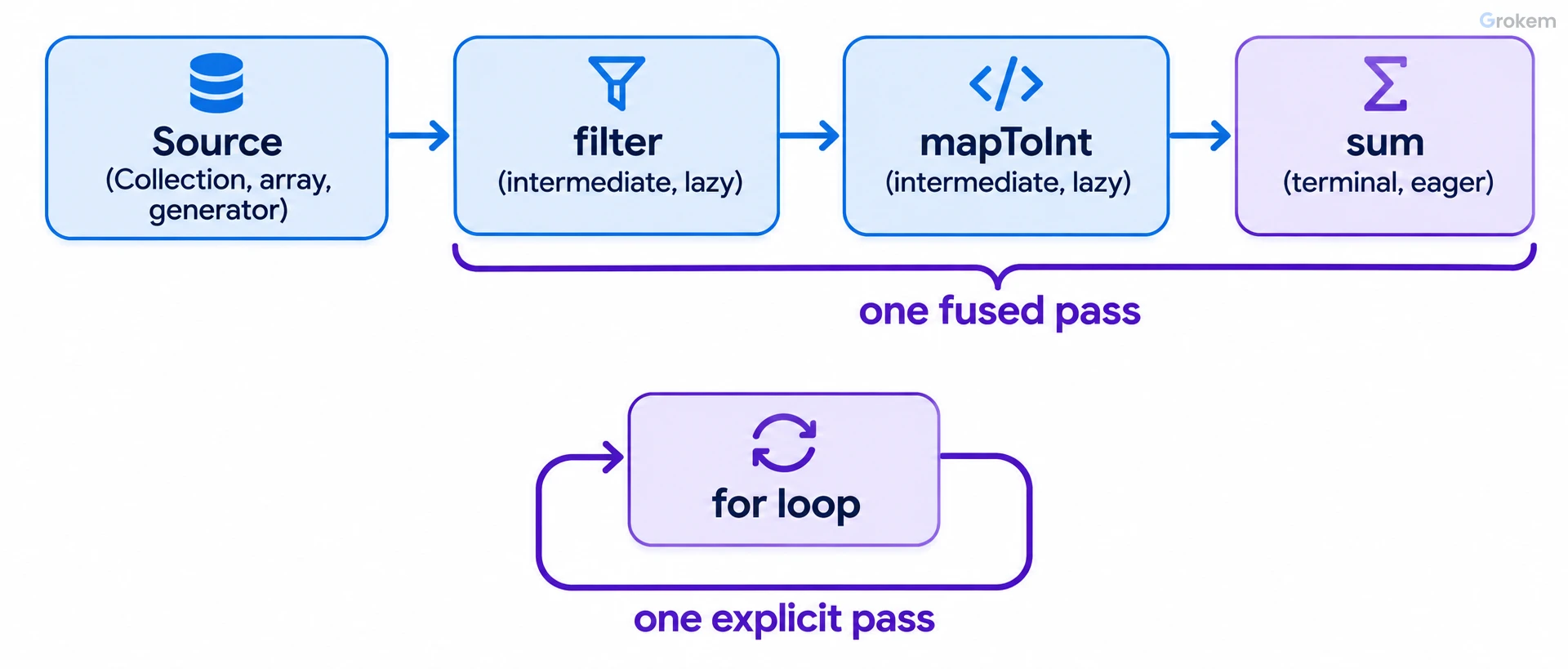
A stream pipeline has three parts, as defined in the java.util.stream package documentation: a source (a collection, an array, a generator function or an I/O channel), zero or more intermediate operations such as filter and map, and one terminal operation such as forEach, reduce or sum.
The package documentation lists the properties that make a stream different from a collection:
- No storage. A stream conveys elements from a source through a pipeline. It is not a data structure.
- Functional in nature. An operation produces a result and does not modify its source.
- Laziness-seeking. Intermediate operations are always lazy. Traversal of the source does not begin until the terminal operation runs.
- Possibly unbounded. Short-circuiting operations such as
limit(n)orfindFirst()let a computation over an infinite stream finish. - Consumable. The elements are visited once. Like an
Iterator, a stream cannot be revisited.
The Stream interface page adds that a pipeline can be viewed as a query on the stream source, and that streams are concerned with declaratively describing the source and the aggregate computation. Collections, by contrast, are concerned with managing and accessing their elements.
The rest of this article keeps that distinction in view: loops give control, pipelines give a declarative description and a runtime that may optimise.
Criteria used for the judgement
You compare the two approaches on these five criteria. Each one maps to a statement you can verify in the official pages or in your own code.
- Readability of simple transformations. How quickly a reviewer sees filter, map and reduce intent.
- Readability of control-heavy logic. How the approach copes with several exits, mutable state and branching.
- Performance characteristics. What the documentation says about traversal, laziness and primitive specialisations, and what it leaves for you to measure.
- Parallelism. How much work you do to use several cores safely.
- Failure modes. The mistakes each approach makes easy.
The Java Tutorials lesson on aggregate operations makes a candid point about the first criterion: for printing every member name, the stream version is longer than the for-each loop, and the benefit only appears for more complex tasks. Keep that in mind. Streams are not automatically shorter or clearer.
Readability: where each approach reads better
For a filter-map-reduce shape, a pipeline reads as one sentence. Compare the same computation both ways. The Widget class here is a minimal stand-in for the one used in the package documentation example.
int sum = widgets.stream()
    .filter(w -> w.getColor() == RED)
    .mapToInt(w -> w.getWeight())
    .sum();
The loop needs a mutable accumulator and a nested if:
int sum = 0;
for (Widget w : widgets) {
    if (w.getColor() == Color.RED) {
        sum += w.getWeight();
    }
}
Both are readable at this size. The pipeline pulls ahead as stages accumulate, because each stage is one line with one responsibility and there is no mutable variable to track. The tutorial's average-age example (filter, mapToInt, average, getAsDouble) shows the same effect: the pipeline names each step, while the loop version would need a total, a count and a division.
The loop wins when the logic is control-heavy. Typical cases:
- You need several exits from the traversal with different outcomes.
- You update more than two pieces of state per element.
- You must throw a checked exception from inside the body. The behavioral parameters of stream operations are instances of functional interfaces such as
Function, so check the signatures before you wrap checked-exception code in a lambda. - You want the traversal to be obvious to a reader who will debug it with a step-through debugger.
A useful test: read the pipeline aloud. If you can describe each stage in one short phrase, the stream is probably clearer. If you find yourself explaining the order of side effects, write a loop.
The documentation also provides an escape hatch for the awkward middle ground. The terminal operations iterator() and spliterator() are provided so that client code can perform an arbitrary, controlled traversal when the existing operations are not sufficient. If you reach for them, a plain loop over the original source is usually simpler.
Performance: what the documentation says and what it does not
The official pages describe design properties, not timings. You can reason about four of them.
Fusion and laziness. The package documentation states that in a filter-map-sum pipeline, filtering, mapping and summing can be fused into a single pass over the data with minimal intermediate state. Intermediate operations create no results until the terminal operation runs. A hand-written loop also makes one pass, so for a plain traversal you should not expect the pipeline to do fewer passes than the loop.
Short-circuiting. Laziness lets a pipeline avoid examining all the data. The documentation's example is finding the first String with three consecutive vowels, which need not examine every input. limit(n) and findFirst() can finish work on an infinite stream. A loop can do the same with break, but a stream expresses it declaratively and also works over generated sources such as Stream.iterate.
Primitive specialisations. IntStream, LongStream and DoubleStream are streams over int, long and double. The reduction tutorial computes a total age two ways: mapToInt(Person::getAge).sum() and map(Person::getAge).reduce(0, (a, b) -> a + b). The second version flows Integer objects through a Stream. When your data is numeric, prefer the primitive form, which also reads better.
Mutable reduction. The tutorial warns that reduce always returns a new value from its accumulator. If you use it to add elements to a collection, each step creates a new collection, which is inefficient. The documented alternative is collect, which mutates an existing result container.
The documentation does not cover per-element overhead of lambdas versus a loop body, JIT behaviour, or any comparison of absolute speed between the two styles. Do not assume either wins. Measure with realistic data sizes and your target JDK, and verify that the loop and the pipeline compute the same result before you compare them.
Parallelism: the largest difference, and the biggest trap
Switching a stream to parallel is a one-word change. You call Collection.parallelStream() or BaseStream.parallel(). The Java Tutorials parallelism lesson explains that the runtime then partitions the stream into substreams, processes them in parallel and combines the results. A loop has no equivalent, so you would use the fork/join framework and specify the partitioning yourself.
That convenience comes with conditions stated plainly in the tutorial:
- Parallelism is not automatically faster than serial execution. It can be if you have enough data and processor cores, and it remains your responsibility to decide whether your application suits it.
- Collections are not thread-safe. Parallel streams work with non-thread-safe collections only if you do not modify the collection while operating on it.
- Some collectors behave differently in parallel. The tutorial says
groupingByperforms poorly with parallel streams, because it merges maps by key, and it presentsgroupingByConcurrentwith aConcurrentMapas the parallel equivalent. A concurrent reduction happens only when the collector has the characteristicCollector.Characteristics.CONCURRENTand the stream is unordered (callBaseStream.unorderedto ensure that), among the conditions listed on that page.
The Stream interface page adds a rule that matters more in parallel code: behavioral parameters must be non-interfering (they do not modify the stream source) and, in most cases, stateless (their result must not depend on state that might change during the pipeline).
The following program runs the concurrent grouping variant on a small list. Run it to confirm the shape of the result. Do not use it to judge speed, because the data set is far too small for parallelism to pay off.
If you want a parallel loop, you own the thread management, the partitioning and the synchronisation. If you want the streams version, you own the question of whether the workload is large enough and the collector is suitable.
import java.util.Arrays;
import java.util.List;
import java.util.concurrent.ConcurrentMap;
import java.util.stream.Collectors;

public class ConcurrentGrouping {
    public static void main(String[] args) {
        List<String> words = Arrays.asList("ada", "bob", "grace", "linus", "kim");

        ConcurrentMap<Integer, List<String>> byLength = words
            .parallelStream()
            .collect(Collectors.groupingByConcurrent(String::length));

        System.out.println("len3=" + byLength.get(3).size());
        System.out.println("len5=" + byLength.get(5).size());
    }
}
Common mistakes with streams
Most stream bugs come from treating a pipeline like a loop with different syntax. These are the ones that the documentation explicitly warns about.
Reusing a stream
A stream must be operated on only once. The Stream interface page says this rules out forked streams and multiple traversals, and that an implementation may throw IllegalStateException when it detects reuse. Detection is not guaranteed in every case, because some operations return their receiver. Keep the source (the collection), not the stream, and call stream() again when you need another traversal.
Relying on side effects
A stream implementation may elide operations, or entire stages, if it can prove that doing so does not affect the result. Side effects in behavioral parameters may therefore not run. The exceptions are the terminal operations forEach and forEachOrdered. The count() API note describes a specific example of this optimisation. Put your side effect in the terminal operation, or better, produce a value with collect or a reduction.
Accumulating into external state
A lambda that adds to a shared list is stateful, and in a parallel pipeline it touches a collection that the tutorial says is not thread-safe. Use collect so that the runtime manages the result containers for you.
Using reduce to build collections
As noted earlier, reduce creates a new value per accumulator call, so building a collection with it is inefficient. Use collect.
Modifying the source during traversal
Unless the source was designed for concurrent modification, such as ConcurrentHashMap, modifying it while the pipeline queries it can give unpredictable or erroneous behaviour. This is the same hazard as changing a list inside a for-each loop, but a lazy pipeline makes it easier to miss because the traversal starts only at the terminal operation.
Forgetting to close streams that own resources
Streams implement AutoCloseable, and operating on a closed stream throws IllegalStateException. Most streams, backed by collections, arrays or generator functions, need no closing. Streams from I/O sources such as BufferedReader.lines() or the Files methods are the ones to review. The Stream interface page is where to check the exact guidance for your JDK.
Passing null
Unless otherwise specified, behavioral parameters must be non-null.
The following program shows the reuse failure in a controlled way. The first terminal operation succeeds, and the second fails because the same stream object is used again.
import java.util.Arrays;
import java.util.List;
import java.util.stream.Stream;

public class ReuseDemo {
    public static void main(String[] args) {
        List<String> names = Arrays.asList("ada", "grace", "linus");

        Stream<String> longNames = names.stream().filter(n -> n.length() > 3);

        System.out.println(longNames.count());

        try {
            System.out.println(longNames.count());
        } catch (IllegalStateException e) {
            System.out.println("IllegalStateException on reuse");
        }
    }
}
Side by side: a runnable comparison
This program computes the same total weight both ways, then shows a short-circuited infinite stream. The loop equivalent of the last part would need an explicit counter and break.
Run it with javac RedWeight.java and java RedWeight. The two sums must match. If they do not, one of your pipelines has a bug, which is the first thing to rule out before any performance comparison.
import java.util.Arrays;
import java.util.List;
import java.util.stream.Stream;

public class RedWeight {
    enum Color { RED, GREEN, BLUE }

    static class Widget {
        private final Color color;
        private final int weight;

        Widget(Color color, int weight) {
            this.color = color;
            this.weight = weight;
        }

        Color getColor() { return color; }
        int getWeight() { return weight; }
    }

    public static void main(String[] args) {
        List<Widget> widgets = Arrays.asList(
            new Widget(Color.RED, 10),
            new Widget(Color.BLUE, 5),
            new Widget(Color.RED, 7));

        int loopSum = 0;
        for (Widget w : widgets) {
            if (w.getColor() == Color.RED) {
                loopSum += w.getWeight();
            }
        }

        int streamSum = widgets.stream()
            .filter(w -> w.getColor() == Color.RED)
            .mapToInt(w -> w.getWeight())
            .sum();

        System.out.println("loop=" + loopSum);
        System.out.println("stream=" + streamSum);

        Stream.iterate(1, n -> n * 2)
            .limit(5)
            .forEach(System.out::println);
    }
}
Judgement per criterion
| Criterion | Streams | For loops |
|---|---|---|
| Simple filter, map, reduce | Clearer as stages grow; no mutable accumulator | Clear at small size; needs accumulators |
| Control-heavy logic | Awkward; escape hatch is iterator() |
Natural |
| Performance | Can fuse into one pass; lazy; short-circuits; use primitive streams for numbers | One explicit pass; nothing hidden |
| Parallelism | One call, runtime partitions; suitability is your decision | You build it yourself |
| Failure modes | Reuse, side effects, stateful lambdas, wrong collector in parallel | Index errors, modifying the source, shared accumulators |
Neither approach is a performance upgrade on its own. The documentation frames streams as a way to describe computation declaratively and to expose optimisation and parallelism opportunities. It does not claim they beat loops on a plain traversal.
What we compared
- Readability of simple filter-map-reduce transformations
- Readability of control-heavy logic with several exits or state
- Performance characteristics: traversal, laziness, short-circuiting, primitive specialisations
- Parallelism effort and safety
- Typical failure modes and how easily they slip in
Recommendation
Use a stream pipeline when the work is a clear sequence of filter, map and reduce steps over a collection, array or generated source, and especially when the numbers are primitives (use IntStream, LongStream or DoubleStream) or the source is large and you can stop early with limit or findFirst. Use a for loop when the logic has several exits, several mutable variables, or code that is easier to follow and debug as explicit control flow, and for tiny or hot traversals where you want nothing hidden. Use a parallel stream only after you have measured a gain on realistic data, with stateless lambdas, an unmodified source and a collector suited to parallel work such as groupingByConcurrent. When in doubt on a simple traversal, pick whichever your team reads fastest, because the documentation gives no basis for claiming either is faster.
Caveats
- The official pages describe design properties and do not publish timings. Any speed claim for your code must come from your own measurement on your JDK and data.
- The Java Tutorials pages cited here were written for an older JDK and say they do not take advantage of later improvements. Check the Javadoc for your JDK release for current behaviour and available methods.
- Stream reuse detection is not guaranteed: some operations return their receiver, so a reuse bug may not always raise an exception.
- Resource handling for streams backed by I/O sources is only summarised here. Read the Stream interface page for the exact closing guidance.
- Debugging a long pipeline can be harder than stepping through a loop. This article does not cover tooling for it, so check your IDE and JDK documentation.
Frequently asked questions
Are Java streams faster than for loops?
The official pages do not say so. They describe fusion of filter, map and sum into a single pass, laziness and short-circuiting, but publish no timings. Measure your own workload.
When is parallelStream a bad idea?
When the data set is small, you have few cores, your lambdas touch shared state, or you modify the source during the pipeline. The Java Tutorials state that parallelism is not automatically faster and that deciding is your responsibility.
Why does my stream throw IllegalStateException?
You most likely operated on the same stream twice, or used it after closing it. A stream should be operated on only once. Call stream() on the source again for each traversal.
Should I use reduce or collect to build a list?
Use collect. The reduction tutorial explains that reduce creates a new value for every element, which is inefficient for collections, while collect mutates an existing container.
Can I modify the list while streaming over it?
Not safely. Unless the source is designed for concurrent modification, such as ConcurrentHashMap, modifying it during the query can cause unpredictable or erroneous behaviour.
What do I do when no stream operation fits?
Use the iterator() or spliterator() terminal operations for a controlled traversal, or write a for loop over the original source.
References
- java.util.stream package summary (Java SE 25 & JDK 25)
- java.util.stream package summary (Java SE 21 & JDK 21)
- Stream interface (Java SE 27 & JDK 27)
- Lesson: Aggregate Operations (The Java Tutorials)
- Reduction (The Java Tutorials > Aggregate Operations)
- Parallelism (The Java Tutorials > Aggregate Operations)
From Grokem: https://www.grokem.com/programming/algorithms-and-data-structures/java-streams-vs-for-loops-when-each-wins-on-readability-and-speed