Before you start
3- Node.js; the code was tested on 22.11.0
- Playwright with Chromium installed (tested on 1.63.0)
- The address of a page that loads your library, and the library's address from the embed code
"Does Adobe Launch slow the site down?" is easy to ask and hard to answer from opinion. Adobe documents how the library should be loaded and what ends up in the main file, but it publishes no size or time target for the library, and the numbers in forum threads are single sites on single days. The honest route is to measure your own library, on your own pages, and compare before and after a change.
This guide shows a short Playwright script that reports how long the library takes to arrive and how big it is, and explains what Adobe's pages say about keeping that low. It measures the download of the library file, which is only part of the cost: the time spent running rules is not in the number, and the guide says so where it matters.
What Adobe documents
Three statements, from Adobe's pages on asynchronous deployment and on rules, drive most of the advice:
- Load the library asynchronously. Adobe's page says you can load any library asynchronously by adding the
asyncattribute to the script tag, and that the browser keeps parsing and rendering while the file loads. A library loaded without it blocks the parser until it has arrived. - Page Bottom adds little when the library is asynchronous. The Page Bottom event type does not particularly provide value then, and the page says you should no longer call
_satellite.pageBottom()from your page code: doing so results in an error and Page Bottom may not behave as expected. - Rules on Library Loaded or Page Top go into the main file. Per Adobe's rules page, rules with those events are bundled into the main library, the file your embed code points to, while actions for other events are loaded as needed. A heavy action on Library Loaded therefore makes the first file bigger.
What the pages do not give is a target: no maximum size, no acceptable load time. Some audit vendors publish thresholds; none of them is an Adobe or Google standard, so use your own baseline.
What the script measures
The browser keeps a timing entry for each resource a page loads. The PerformanceResourceTiming entry has the fields the script reads:
| Field | Meaning (from MDN) |
|---|---|
startTime |
When the fetch started |
duration |
The difference between responseEnd and startTime |
encodedBodySize |
The size in octets received from the fetch, before content encodings are removed |
transferSize |
The size of the response body plus a fixed value for the headers |
duration ends when the last byte arrives. It does not include the time the browser then spends running the library and its rules, so a library that is small to download and slow to run looks fine here.
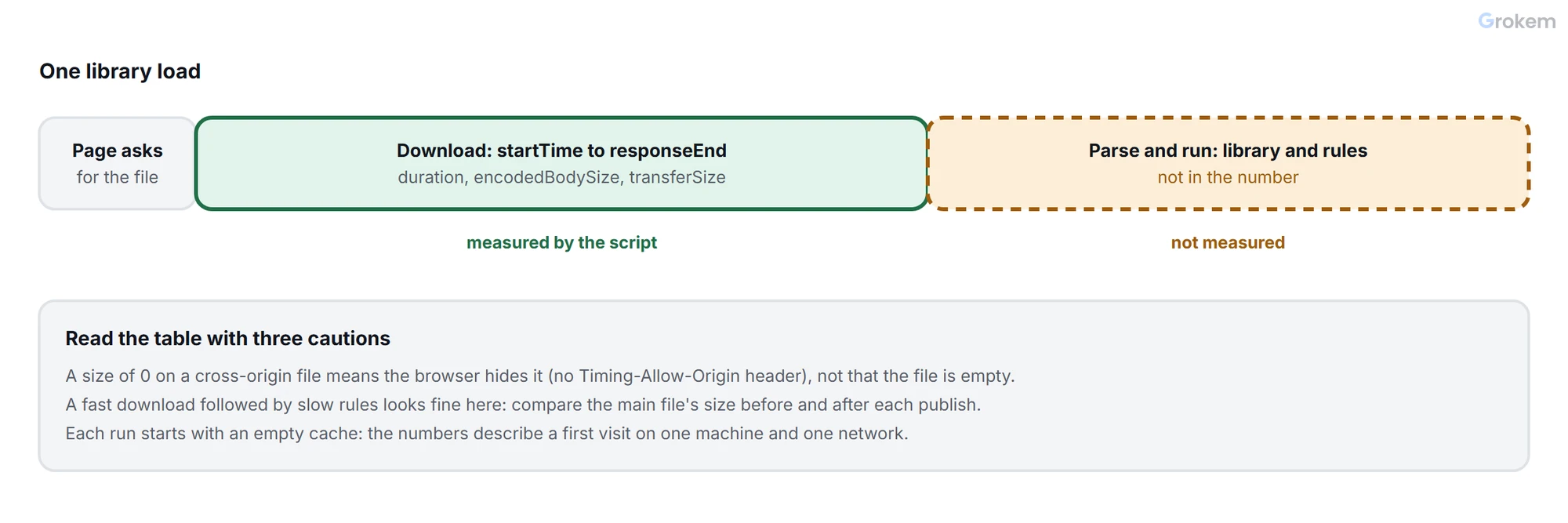
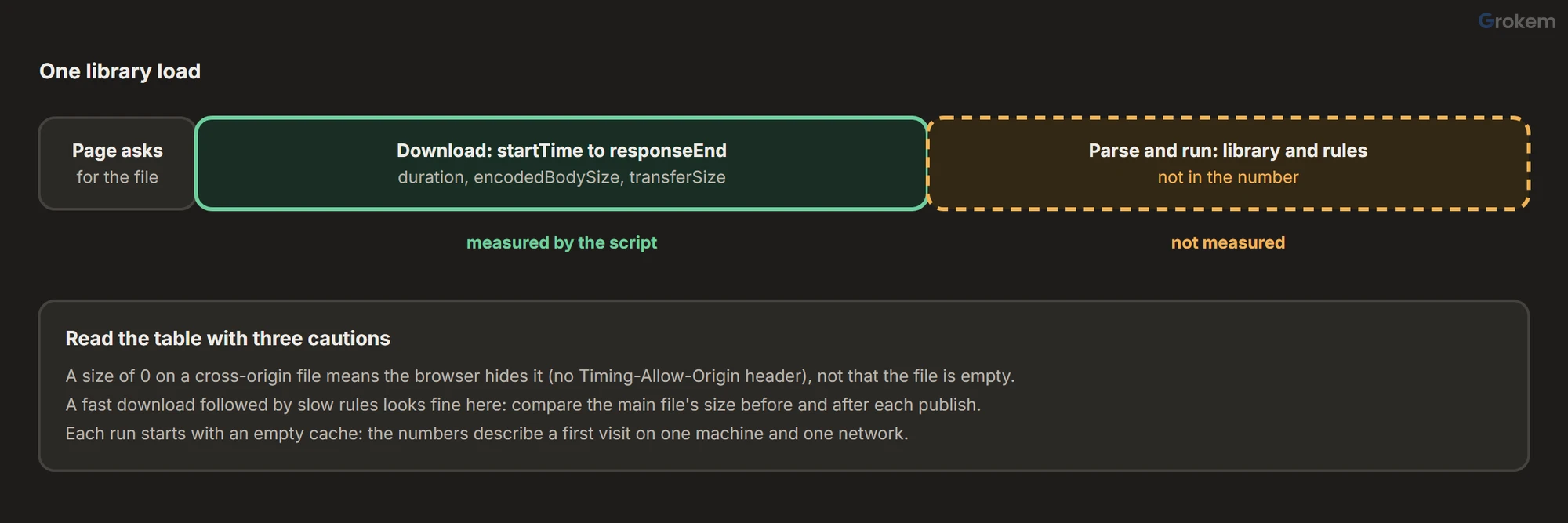
There is a restriction to know before you read the table. MDN explains that timing information for a cross-origin resource is restricted unless it passes the Timing-Allow-Origin check, and transferSize is on the list of properties that return 0 in that case. When the script ran against a stand-in library on another origin without the header, encodedBodySize came back as 0 as well, so a size of 0 means "hidden by the browser", not "empty".
Step 1 of 5: Install Playwright
As in the Playwright guide:
npm i -D playwright
npx playwright install chromium
Step 2 of 5: Save the script
// measure-library.mjs
// Usage: node measure-library.mjs <page url> <part of the library address> [runs]
//        node measure-library.mjs            (no arguments: measures a stand-in page)
import { chromium } from 'playwright';

const [pageArg, pattern = 'launch-', runsArg = '5'] = process.argv.slice(2);
const runs = Number(runsArg);
const demo = !pageArg;
const pageUrl = pageArg ?? 'https://store.example.com/';

const median = (values) => [...values].sort((a, b) => a - b)[Math.floor(values.length / 2)];

// What the stand-in page and library look like when no address is given.
async function installDemo(page) {
  const asyncAttribute = process.env.SYNC ? '' : ' async';
  const timingHeaders = process.env.TAO ? { 'timing-allow-origin': '*' } : {};
  await page.route('https://store.example.com/', (route) => route.fulfill({
    status: 200,
    contentType: 'text/html',
    body: `<!doctype html><title>Demo</title><script${asyncAttribute} src="https://assets.example.net/launch-demo.min.js"></script><h1>Demo</h1>`,
  }));
  await page.route('https://assets.example.net/**', async (route) => {
    await new Promise((resolve) => setTimeout(resolve, 150)); // a library that takes a while to arrive
    await route.fulfill({ status: 200, contentType: 'text/javascript', headers: timingHeaders, body: '/* demo */ ' + 'x'.repeat(40000) });
  });
}

const browser = await chromium.launch();
const results = [];
let embed = [];

for (let run = 1; run <= runs; run++) {
  const context = await browser.newContext(); // a fresh cache each time: this measures the first visit
  const page = await context.newPage();
  if (demo) await installDemo(page);
  await page.goto(pageUrl, { waitUntil: 'load' });
  await page.waitForLoadState('networkidle'); // an asynchronous library can finish after the load event

  const found = await page.evaluate((part) => {
    const entry = performance.getEntriesByType('resource').find((e) => e.name.includes(part));
    const tags = [...document.querySelectorAll('script[src]')].filter((s) => s.src.includes(part));
    return {
      entry: entry && {
        duration: entry.duration,
        startTime: entry.startTime,
        encodedBodySize: entry.encodedBodySize,
        transferSize: entry.transferSize,
        initiatorType: entry.initiatorType,
      },
      tags: tags.map((s) => ({ async: s.hasAttribute('async'), defer: s.hasAttribute('defer') })),
    };
  }, pattern);

  if (!found.entry) {
    console.error(`No resource with "${pattern}" in its address was loaded by ${pageUrl}`);
    await browser.close();
    process.exit(1);
  }
  results.push(found.entry);
  embed = found.tags;
  await context.close();
}
await browser.close();

console.log(`Library matching "${pattern}" on ${pageUrl}, ${runs} first visits:`);
console.table(results.map((r, i) => ({
  run: i + 1,
  'starts at (ms)': Math.round(r.startTime),
  'duration (ms)': Math.round(r.duration),
  'body (bytes)': r.encodedBodySize,
  'transfer (bytes)': r.transferSize,
})));
console.log(`Median duration: ${Math.round(median(results.map((r) => r.duration)))} ms`);
console.log(embed.length
  ? `Script tag: ${embed.map((t) => (t.async ? 'async' : t.defer ? 'defer' : 'no async or defer (blocks the parser)')).join('; ')}`
  : 'No script tag with that address in the page (the library may be inserted by another script).');
if (results.some((r) => r.transferSize === 0 && r.encodedBodySize === 0)) {
  console.log('Sizes of 0: the library comes from another origin without a Timing-Allow-Origin header, so the browser hides them.');
}
Each run uses a fresh browser context, so there is no cache: the numbers describe a first visit. The script waits for the network to go quiet after the load event, because an asynchronous library can finish after it; that wait is fine for a measurement, though Playwright's own guidance discourages it for tests.
Step 3 of 5: Try it on the stand-in page
With no arguments the script measures a stand-in: an asynchronous library on another origin that takes about 150 ms to arrive and weighs about 40 KB. It was run on Node 22.11.0 with Playwright 1.63.0:
node measure-library.mjs
Library matching "launch-" on https://store.example.com/, 5 first visits:
┌─────────┬─────┬────────────────┬───────────────┬──────────────┬──────────────────┐
│ (index) │ run │ starts at (ms) │ duration (ms) │ body (bytes) │ transfer (bytes) │
├─────────┼─────┼────────────────┼───────────────┼──────────────┼──────────────────┤
│ 0       │ 1   │ 8              │ 167           │ 0            │ 0                │
│ 1       │ 2   │ 5              │ 159           │ 0            │ 0                │
│ 2       │ 3   │ 4              │ 165           │ 0            │ 0                │
│ 3       │ 4   │ 4              │ 156           │ 0            │ 0                │
│ 4       │ 5   │ 8              │ 167           │ 0            │ 0                │
└─────────┴─────┴────────────────┴───────────────┴──────────────┴──────────────────┘
Median duration: 165 ms
Script tag: async
Sizes of 0: the library comes from another origin without a Timing-Allow-Origin header, so the browser hides them.
The duration matches the 150 ms the stand-in waits, which is the check that the script reads the right entry. Setting the environment variable TAO=1 makes the stand-in send the Timing-Allow-Origin header and the sizes appear (40011 bytes of body and 40311 transferred); setting SYNC=1 removes the async attribute and the last line changes to "no async or defer (blocks the parser)".
Step 4 of 5: Run it on your own pages
Open your page's source and find your library's address in the embed code. Use a fragment of it as the second argument. The script's default, launch-, is a guess: use the text that your own embed code shows.
node measure-library.mjs https://www.example.com/ launch- 7
Measure the pages that matter (the home page, a long article, the checkout), and more than once: the median of five to seven runs is steadier than one number. Write the results next to the date and the library build, which _satellite.buildInfo reports in the console (Adobe Launch audit check 7).
Step 5 of 5: Read the result and act
| What the output shows | What it suggests | What to do |
|---|---|---|
The last line says the tag has no async or defer |
The library blocks parsing | Add the async attribute, as Adobe documents |
| Sizes of 0 | The browser hides them for a cross-origin file | Ask whoever serves the library to add a Timing-Allow-Origin header, or read the sizes in the Network panel |
| A body size much larger than before a publish | Something was added to the main file | Look for heavy actions on Library Loaded and for unused extensions |
| A long duration with a small body | The delay is the network or the server, not the content | Compare from another location before changing rules |
| Large run-to-run differences | Network noise | Take more runs; compare medians, not single runs |
When the size has grown, the usual suspects are the ones on Adobe's pages: actions on Library Loaded or Page Top that sit in the main file, and extensions nobody uses any more, which the audit lists as its second check.
Limits of the measurement
- It measures arrival, not execution. A fast download followed by slow rules is invisible here.
- It is one machine and one network. Treat it as a before-and-after comparison, not as a field measurement of your visitors.
- Chromium only, and with a cold cache; a returning visitor's cached library costs far less.
- A library inserted by another script may not be in the page's script tags; the script still finds the timing entry, and the last line says so.
Expected result
The script prints a table with, for each first visit, when the library request started, its duration and its size, then the median duration and whether the script tag has `async`. On the stand-in page it reports a median of about 160 ms for a library that takes 150 ms to arrive.
Troubleshooting
| Problem | Likely cause | Fix |
|---|---|---|
| The script says no resource with the text was loaded. | The text you gave is not part of your library's address, or the library is loaded from another address than you expect. | Open the page's source, find the library in the embed code and use a fragment of that address as the second argument. The default launch- is only a guess. |
| The sizes are 0. | The library comes from another origin without a Timing-Allow-Origin header, so the browser hides sizes it would otherwise report. | Ask whoever serves the file to add the header, or read the size in the browser's Network panel. |
| The last line says there is no script tag with that address. | Another script inserts the library, so it is not in the page's markup. | The timing entry is still valid. Check the embed code in the page's source for the async attribute. |
| The duration differs a lot between runs. | Network noise on one machine and one connection. | Use seven runs or more and compare medians, not single runs. |
| The numbers look fine but the page still feels slow. | The measurement stops when the last byte arrives. Time spent running the library and its rules is not in it. | Compare the main file's size before and after each publish, and look for heavy actions on Library Loaded. |
Frequently asked questions
What is a good load time for the library?
Adobe's pages give no target. Some audit vendors publish thresholds, and none of them is an Adobe or Google standard. Use your own baseline and compare before and after changes.
Does async loading make the library free?
No. Adobe's page says the async attribute lets the browser keep parsing and rendering while the file loads. The file still has to be downloaded and run.
Why does a Library Loaded rule matter for size?
Per Adobe's rules page, rules with the Library Loaded or Page Top events are bundled into the main library file; actions for other events are loaded as needed.
Does the script measure a returning visitor?
No. Each run starts with an empty cache, so it describes a first visit. A returning visitor's cached library costs far less.
Next steps
- Review the rest of the property: [Adobe Launch audit](https://www.grokem.com/data/data-analytics/tag-management/adobe-launch-audit-step-by-step-property-review-with-scorecard)
- Check what the library sends: [test Adobe Launch beacons with Playwright](https://www.grokem.com/data/data-analytics/tag-management/test-adobe-launch-beacons-automatically-with-playwright)
- Understand timing inside the page: [rule timing](https://www.grokem.com/data/data-analytics/tag-management/why-an-adobe-launch-data-element-is-empty-rule-timing-and-order-explained)
References
From Grokem: https://www.grokem.com/data/data-analytics/tag-management/adobe-launch-performance-audit-measure-your-library-with-a-script