
A rule fires, the Debugger shows it, and the variable it should have sent is empty. The data element is defined, the source value is on the page, and yet the value is missing. In almost every case the data element is fine and the clock is the problem: the rule asked for the value at a moment when the page had not produced it yet.
This guide explains that clock for Adobe Launch (now called Tags in Adobe Experience Platform data collection): when each page-load event fires, what changes when the library loads asynchronously, how rule order works and where it does not help, and how to see the timing for yourself. It describes the web client-side library; server-side forwarding has its own rules.
The short answer
A data element is not read when the page loads. Adobe's documentation says data elements are populated with data when they are used in rules or when a script calls them manually. Each time a rule reads %page_name% or runs _satellite.getVar('page_name'), Tags works out the value at that moment. If the thing the data element reads (a DOM element, a JavaScript variable, a data layer object) does not exist yet, the answer is empty.
So an empty value has one of three causes:
- The rule ran too early. Its event fired before the page produced the value.
- The value is stale or stored. The data element's storage duration returned an old value, or none.
- Another rule has not finished. A rule that should set something first ran in the wrong order, or finished after the rule that needs it.
The rest of this page separates the three.
What "when used" means
When a data element's code returns nothing, Tags falls back first to a stored value (if the element's storage duration keeps one) and then to the default value, if one is enabled. The storage duration options decide what can come back:
| Storage duration | The value is held |
|---|---|
| None | Not stored |
| Page view | In a JavaScript variable until the page is refreshed or a new page is loaded |
| Session | In session storage until the browser tab is closed |
| Visitor | Indefinitely in the browser's local storage |
A data element that reads something the page fills in later does not fail loudly. It returns the fallback, and the fallback looks like a value that is simply missing.
The page-load clock
The page-load event types in the Core extension fire at different moments:
| Event type | When it fires |
|---|---|
| Library Loaded (Page Top) | As soon as the tag library loads |
| DOM Ready | When the DOM is ready and users can interact with the page |
| Window Loaded | When the browser calls onLoad and the page has finished loading |
| Page Bottom | After _satellite.pageBottom() is called |
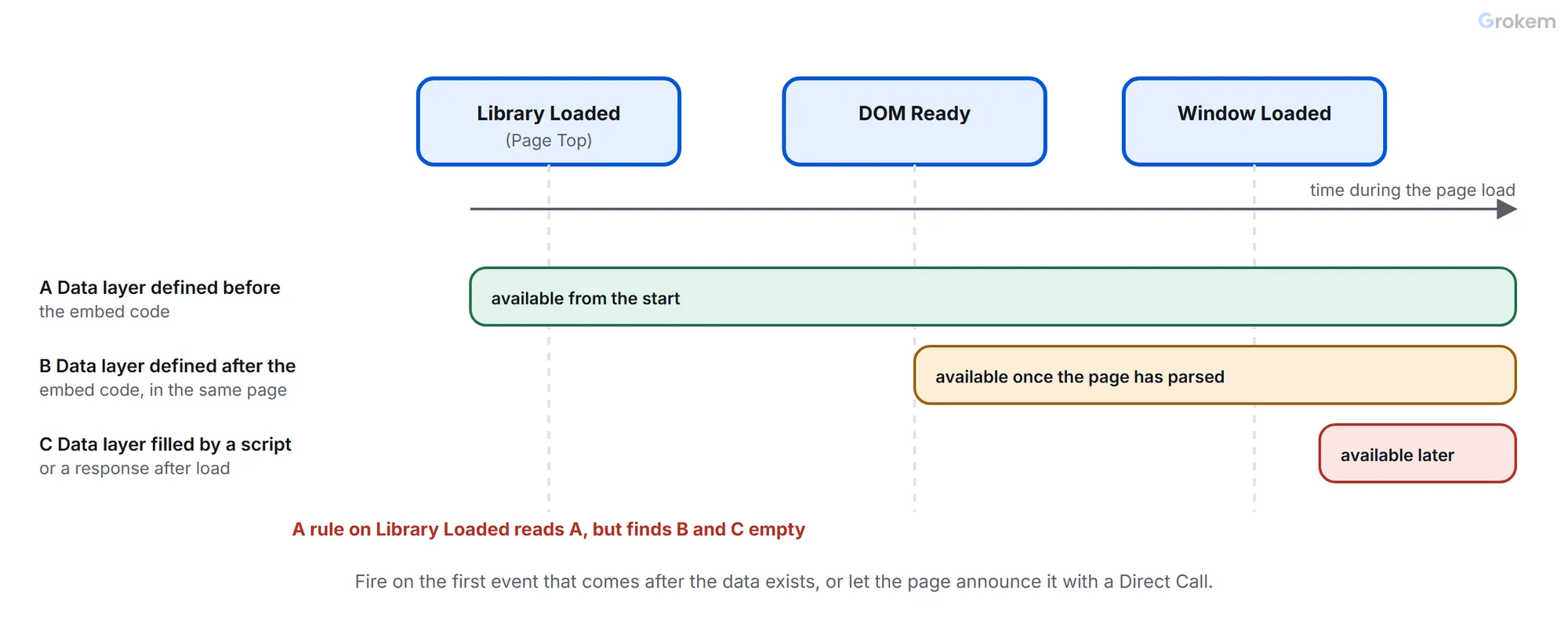
Two details cause most of the trouble.
Library Loaded is the earliest, not the safest. It fires the moment the library is ready. If the library is placed in the head and loads before the body exists, the DOM is not there. If the page fills its data layer later, from a script at the bottom or from a response that arrives after load, the data layer is not there either. Adobe's page on asynchronous deployment says so directly: a rule using the Library Loaded event type might execute before your data layer is fully loaded.
With an asynchronous embed, the library can finish loading before or after the page's own events. If DOM Ready has already happened when the library arrives, the rules on DOM Ready run immediately; the same holds for Window Loaded. For an asynchronous embed the Page Bottom event type adds little value, and _satellite.pageBottom() should no longer be called from the page: calling it results in an error and Page Bottom may not behave as expected.
Choosing the event
The right event is the first one that happens after the data exists. Use this as a starting point:
| Where the value comes from | Fire on |
|---|---|
| A data layer object defined in the page before the embed code | Library Loaded works, because the object exists when the library arrives |
| A data layer object defined after the embed code, in the same document | DOM Ready or Window Loaded, or announce readiness (below) |
| A data layer filled by a script or a response after load | Not a page-load event: use a Custom Event or Direct Call fired when the data is ready |
| A DOM element in the body | DOM Ready at the earliest; Window Loaded for elements added by scripts during load |
| A value that changes after the page loads | The Data Element Changed event, or the Custom Event that announces the change |
The first row follows from how the clock works rather than from a sentence in Adobe's pages, so test it on your page rather than trusting the table.
Announce readiness instead of guessing
When the timing is not fixed, stop guessing the moment and let the page say it. Adobe recommends the Custom Event or Direct Call event type for a data layer that may not be fully loaded. A Direct Call rule starts when _satellite.track() is called with the rule's identifier, and an optional second argument carries a payload that rules read as event.detail or %event.detail%:
// In the page code, after the data layer is complete
window.dataLayer = window.dataLayer || {};
window.dataLayer.page = { name: 'checkout:payment', type: 'checkout' };
if (window._satellite) {
  _satellite.track('page-ready', { name: 'checkout:payment' });
}
The Direct Call rule with the identifier page-ready now runs when the page says the data is there, whether the library loaded a second ago or a minute ago. The if is the guard Adobe recommends for calls to _satellite from site code, because the library may not exist yet or may be blocked. One catch: if the library arrives after this line has run, the call is skipped and the rule does not start, so on a page where the library loads asynchronously also give the rule a fallback event, or load the library before this code.
Rule order: what it does and what it does not
Order controls which rule starts first among rules that share an event. Adobe's rules page states the details:
- The default order for every rule component is 50.
- Rules with lower order numbers run before rules with higher numbers.
- Rules with the same order run in no particular order.
- Order applies to rules that share an event; rules on different events are ordered by when their events happen.
- Rules are fired in order but do not necessarily finish in the same order.
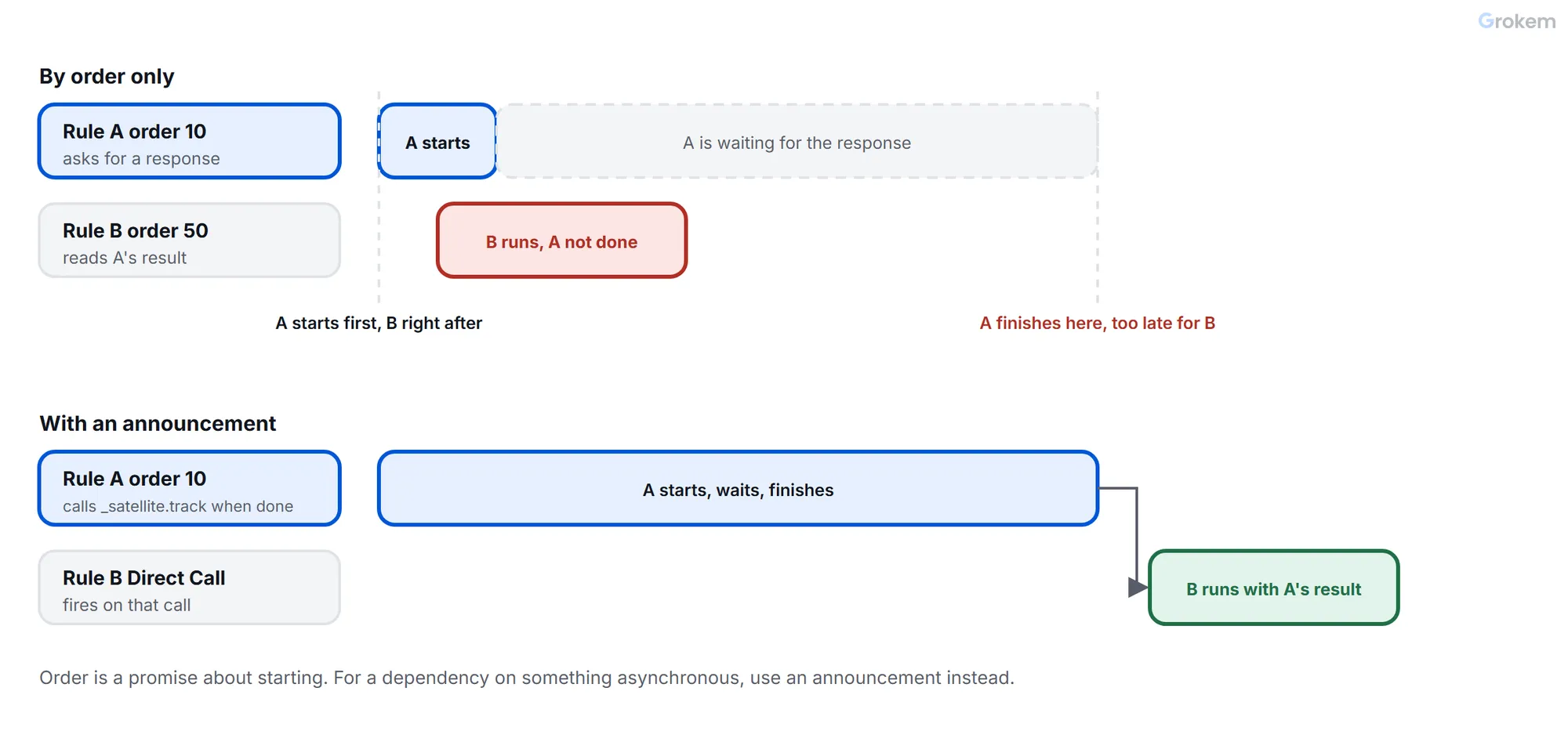
The last point is the one that surprises people. If rule A starts first and does something asynchronous, such as a request, nothing guarantees it has finished when rule B starts. Order is a promise about starting, not about finishing.
The property setting Run rule components in sequence is a different thing again: it decides whether the conditions and actions inside one rule wait for each other. When it is enabled, components are processed one at a time in first-in, first-out order; when it is disabled, conditions are evaluated in parallel and Tags does not wait for one to complete before calling the next. It does not change the order in which rules run.
So the fix for "rule B needs what rule A produces" depends on what A does:
- A sets a value synchronously (a data element, a variable on
s): give A a lower order than B, both on the same event. - A does something asynchronous: B must not depend on it through order. Let A announce completion with a Direct Call or Custom Event, and let B fire on that.
- A and B are on different events: order does not apply. The event timing decides, as in the clock above.
Seeing the timing yourself
Turn on the library's own messages, reload, and read them in order:
_satellite.setDebug(true);
Tag debug mode is stored in the browser's local storage for the page's origin, so it stays on across reloads and restarts until you turn it off with _satellite.setDebug(false). Each log line starts with a rocket symbol followed by the name of the rule, extension or data element in brackets. The logs show that code ran, not that a request reached Adobe, so confirm anything that matters in the Network panel.
To see what a data element holds at a given moment, read it in the console and again after the page has finished loading:
_satellite.getVar('page_name'); // the value now, or undefined / empty if nothing is there yet
If the value is empty at the moment the rule fired and present a second later, you have a timing problem and the choice of event is the fix. If it is empty both times, the source is wrong, not the timing: check the data element's type, selector or path.
Two settings that change what "empty" looks like
The property setting Return an empty string for missing data elements changes what a reference to a data element that does not exist returns: an empty string instead of undefined. It is about a name that is not defined, which is not the same as a defined data element whose source has no value yet. Do not rely on it to hide a timing problem; it only changes how the problem looks.
A data element's default value has to be enabled on the element. If it is not, the element has no fallback. A default is a way to keep reports consistent when a value is missing, not a repair for a rule that fires too early.
Checklist for a data element that arrives empty
- Reload with
_satellite.setDebug(true)and note the order in which the rules log. - In the console, read the data element with
_satellite.getVarright away and again after the page has loaded. - Empty then present: move the rule to a later event, or announce readiness with a Direct Call.
- Empty both times: fix the data element's source.
- Present but wrong: check the storage duration, and whether a previous page's value is being returned.
- Depends on another rule: set the order for a synchronous dependency; use an announcement for an asynchronous one.
Troubleshooting
| Problem | Likely cause | Fix |
|---|---|---|
| The data element is empty in a rule that fires on Library Loaded, but the same data element is fine on DOM Ready. | Library Loaded fires as soon as the library arrives. The page had not produced the value yet; DOM Ready comes later. | Move the rule to the first event after the data exists, or have the page announce readiness with `_satellite.track()` and fire a Direct Call rule. |
| The value is there on pages where the data layer is defined in the page and empty on pages where a script fills it. | Those pages produce the data after every page-load event, so no page-load event is late enough. | Fire the rule on a Custom Event or Direct Call that the page triggers when the data is complete. Adobe recommends these for a data layer that may not be fully loaded. |
| After switching to an asynchronous embed, a Page Bottom rule stopped working and the console shows an error. | For an asynchronous embed, Page Bottom adds little value and a call to `_satellite.pageBottom()` results in an error. | Remove the `_satellite.pageBottom()` call from the page and move the rule to Library Loaded, DOM Ready or Window Loaded, or to a Custom Event or Direct Call. |
| Rule B reads a variable that rule A sets, but only sometimes gets it. | Both rules are on one event with the default order 50, and rules with the same order run in no particular order. | Give A a lower order than B. Order applies only to rules that share an event. |
| Rule A has a lower order than rule B, and B still reads an empty value. | A does something asynchronous, such as a request. Rules are fired in order but do not necessarily finish in that order. | Let A announce completion with `_satellite.track()` and fire B on that Direct Call instead of relying on order. |
| The data element shows an old value from an earlier page, or a value from a previous visit. | Its storage duration is Page view, Session or Visitor, and the fallback returns the stored value when the element resolves to nothing. | Set the storage duration to None for page-specific values. Use a default value only where a missing value should look the same in every report. |
| In the console the data element has a value, but the rule saw an empty one. | The console read happened later. A data element is evaluated when it is used, so the rule read it at an earlier moment. | Turn on `_satellite.setDebug(true)`, reload, and read the data element in the console right after load and again later to find the moment the value appears. |
| A reference to a data element returns undefined where an empty string is expected. | A data element that does not exist returns `undefined` unless the property setting 'Return an empty string for missing data elements' is on. | Check the name first. Turn the setting on only if you want an empty string for a missing name, and know that it does not hide a timing problem. |
| A page calls `_satellite.track('page-ready')` and nothing happens. | The library had not loaded when the line ran, so the guarded call was skipped, or no Direct Call rule has that exact identifier. | Check the identifier in the rule, load the library before the call, or give the rule a fallback event such as DOM Ready. |
| Nothing in the console shows which rule ran when. | Tag debug mode is off. It is stored for the page's origin and has to be turned on there. | Run `_satellite.setDebug(true)` in the console on the page and reload. Log lines start with a rocket symbol followed by the rule, extension or data element name. |
Frequently asked questions
Do I still need the Page Bottom event?
Not for an asynchronous embed. Adobe says the Page Bottom event type does not particularly provide value when the library loads asynchronously, and the `_satellite.pageBottom()` call should be removed. Use Library Loaded, DOM Ready, Window Loaded, a Custom Event or a Direct Call.
Which event should a rule use when it reads the data layer?
The first one after the data layer is complete. If the page defines it before the embed code, Library Loaded works. If it is filled later, use a Custom Event or Direct Call that the page triggers when the data is ready.
Does rule order apply across different events?
No. Rule ordering controls the order of rules that share an event. Rules on different events run when their events happen.
Does 'Run rule components in sequence' fix an asynchronous dependency between two rules?
No. It decides whether the conditions and actions inside one rule wait for each other, and it does not change the order in which rules run.
Is a default value a fix for an empty data element?
No. It is a fallback that keeps reports consistent when a value is missing. A rule that reads the value too early still reads the fallback, so fix the timing.
References
From Grokem: https://www.grokem.com/data/data-analytics/tag-management/why-an-adobe-launch-data-element-is-empty-rule-timing-and-order-explained