A link click sends a hit that carries the page's variables. A single-page route change arrives with the previous route's events. A report credits an eVar value to pages that did not set it. All three look like "values in the wrong hit", but they have two different causes, and the fix for one does nothing for the other.
This guide separates them, explains how the Adobe Analytics extension holds variables between beacons, shows what Clear Variables and linkTrackVars really do, and ends with a way to tell in the Network panel which cause you have.
Two places a value can live
A value can persist in two different places, and each has its own remedy.
- On the tracker object in the browser. The Analytics extension creates the tracking object once per page. Variables set by rules stay on it, so a later beacon from the same page can carry them. This is a client-side leak: you can see the value in the outgoing request.
- On the visitor in Analytics. An eVar is sent with a hit, and Adobe then remembers the value for the visitor until it expires. Later success events are credited to it. This is not a leak but how eVars are designed: the value is not in the later request, and the report still shows it.
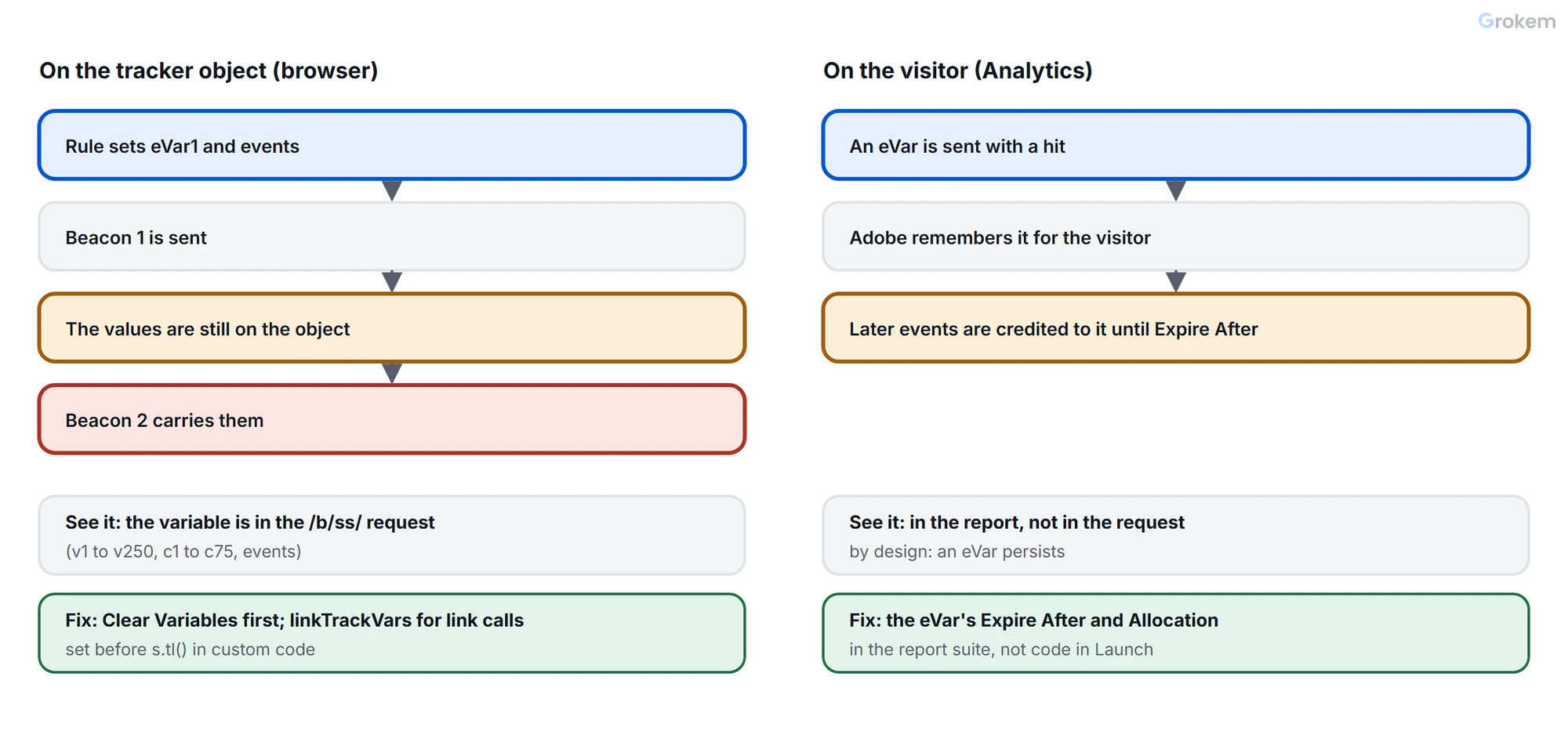
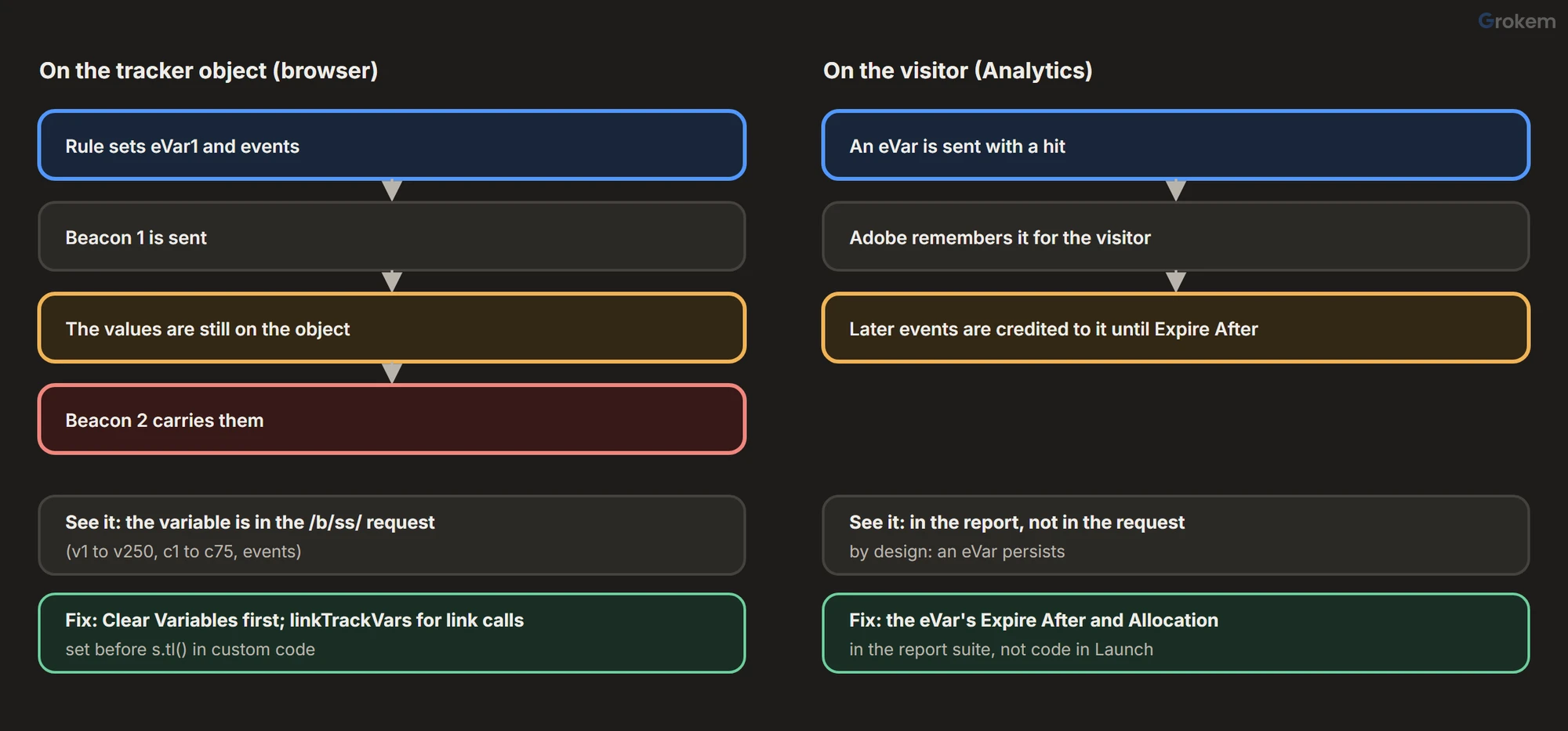
The quick test: open the Network panel, filter for /b/ss/ and look at the request that seems wrong. If the variable is in the request, the cause is on the tracker object (sections below, first three). If it is not in the request and the report still shows it, the cause is eVar expiration (last section).
How variables live on the tracker object
Adobe's extension page says that if your application sends more than one beacon per page, such as a single-page application, and you need to clear and reset variables using the same tracking object, it is simpler to rely on rules to set and clear them. Variables set that way are like any other variables, so a rule can modify or clear them.
The method that clears them is clearVars. Per Adobe's page, its only purpose is to clear variable values from the instance object. It sets these to undefined:
prop1toprop75andeVar1toeVar250;hier1tohier5andlist1tolist3;events,products,channel,purchaseID,transactionID,state,zipandcampaign.
In a rule you do not write code: add the Clear Variables action of the Adobe Analytics extension, which has no options. The page does not say whether clearVars touches linkTrackVars or linkTrackEvents, so do not count on it.
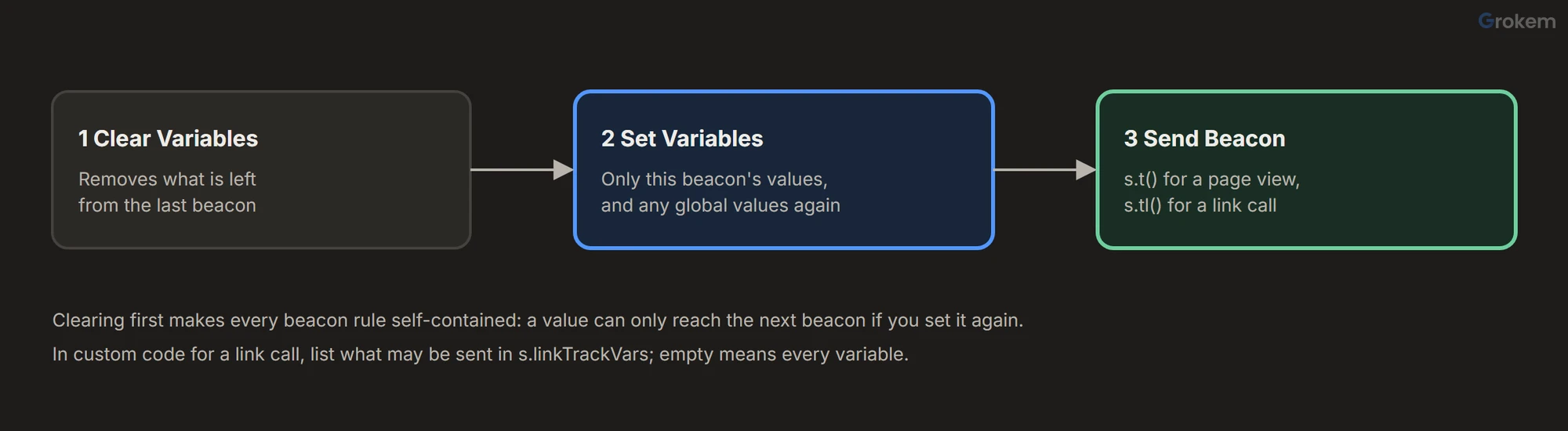
The order inside a rule matters:
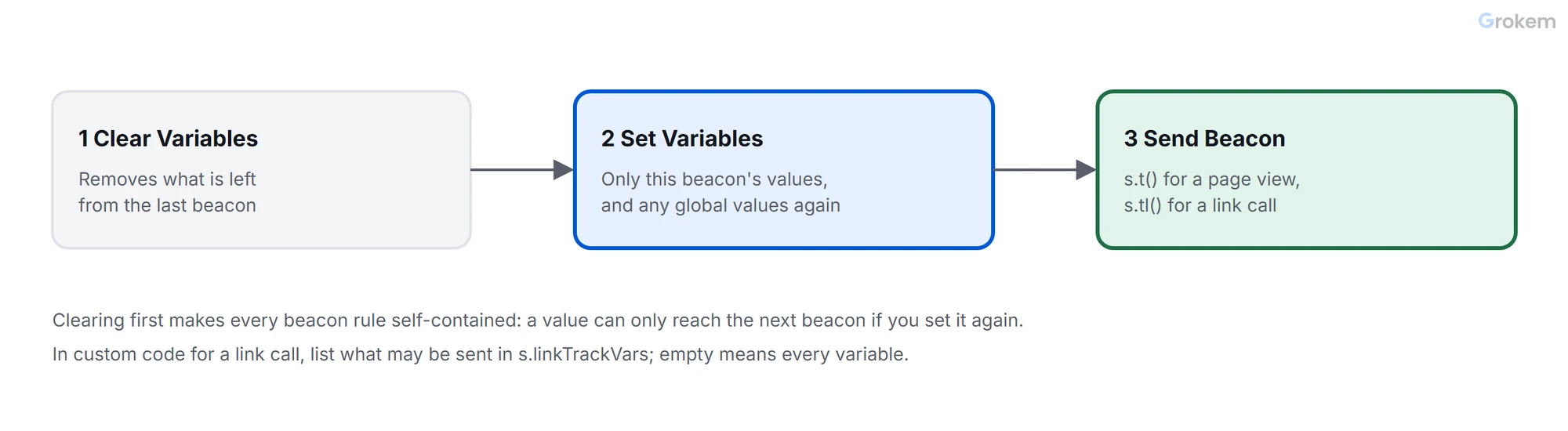
- Clear Variables.
- Set Variables, from data elements that read the new state.
- Send Beacon.
Adobe's page on implementing with AJAX advises calling clearVars after each hit and before setting the next hit's values. That works if every beacon follows it, but clearing first makes each rule self-contained, which is safer when several rules send beacons.
Link calls carry what is on the object
A link beacon is sent with s.tl(). It works like s.t() but does not increment page views. What it sends is controlled by linkTrackVars:
- Adobe describes
linkTrackVarsas a comma-delimited list of the variables to include in link tracking requests. - If it is empty or undefined, all variables are included.
- If it is set to
"None", none are included. Adobe notes that its default is an empty string, while the AppMeasurement code from Code Manager sets it to"None". - If it holds a list, only the listed variables are sent, and a variable must also have a value to be included.
- It is not used for page view calls.
The consequence: on a page that sets eVar1 to eVar10 at load, a link call with an empty linkTrackVars sends all ten. That is the first symptom in the table below. In custom code you control linkTrackVars:
s.linkTrackVars = 'eVar5,events';
s.linkTrackEvents = 'event10';
s.eVar5 = 'newsletter-signup';
s.events = 'event10';
s.tl(true, 'o', 'Newsletter signup');
Adobe's extension page does not say how Set Variables values are included in a link call from the Send Beacon action, so in the extension check the request in the Network panel rather than assume.
Two related duplicates come from automatic link tracking. Download and exit link tracking call s.tl() for you, so a manual s.tl() for the same clicks sends duplicate data, which Adobe warns inflates reports. Adobe suggests checking whether s.lt() returns a value before calling s.tl() yourself. For page view duplicates see fix duplicate page views.
Extension variables and Clear Variables
The extension's Global Variables are set on the tracking object when it initializes. Adobe says that once set they are like any other variables: a rule can change or clear them. That means a Clear Variables action also clears them, because the method clears the same variables. If a global value, such as a site-wide eVar, is missing from the beacon after you add Clear Variables, set it again in the rule.
Version matters too. The extension's release notes record fixes for a clearVars problem in 2019 (extension 1.7.3 and 1.7.5, with a rollback in 1.7.4). Check the installed version before you debug your rules; the audit lists extension versions as its second check.
When it is eVar expiration
If the request is clean and a report still credits a value to later events, look at the eVar's Expire After setting in the report suite. Adobe's admin page describes it as when the value stops receiving credit for success events: Visit, Hit, a time from a minute to a year, a custom number of days, a selected event, or no time-based expiry at all. An eVar value is sent in a hit, and Adobe remembers it for the visitor until it expires.
Three consequences:
- Clearing the variable in Launch does not remove a value Adobe has already recorded for the visitor.
- Changing the expiration does not reset existing values: values already collected persist for the duration of the new setting. Only the Reset option expires values immediately, and it does not erase history.
- Allocation decides which value gets the credit: Most Recent, Original Value or Linear. A value that seems to "stick" may be the Original Value allocation working as designed.
If you want a value to apply to one hit only, the setting for that is Hit, in the report suite, not code in Launch.
Find the cause in five steps
- Open the Network panel, filter for
/b/ss/and trigger the action that shows the wrong value. - Open the request and find the variable. Adobe's parameters are
v1tov250for eVars,c1toc75for props,events(orev) for events andpe/pev2for a link call and its name. - Present in the request: the value is still on the tracker object. Add Clear Variables first in each beacon rule, and set
linkTrackVarsfor link calls in custom code. - Absent in the request but present in the report: check the eVar's Expire After and Allocation.
- After the fix, send two different actions in a row and confirm each request carries only its own values.
Troubleshooting
| Problem | Likely cause | Fix |
|---|---|---|
| A link click sends all the variables the page set at load. | The link call goes out with an empty or undefined linkTrackVars, and Adobe says that when it is empty all variables are included in link tracking requests. | In custom code, set s.linkTrackVars to the list the call may carry, or to "None", before s.tl(). In the extension, check the request in the Network panel. |
| Events from an earlier hit are repeated in the next one. | The events variable is still set on the tracker object. Clear Variables was not run, or ran before the earlier beacon was sent. | Add Clear Variables as the first action in every rule that sends a beacon. |
| On a single-page application, a route change arrives with the previous route's variables. | The tracking object is created once per page, so values set for the first view stay on it for the next. | Clear Variables, then Set Variables from data elements that read the new route, then Send Beacon. |
| A report credits an eVar value to pages that never set it, and the request does not contain it. | The eVar's Expire After keeps the value for the visitor, so later events are credited to it. | Change Expire After or Allocation in the report suite. Code in Launch cannot remove a value already recorded. |
| Link calls double the server calls and inflate the numbers. | Automatic download and exit link tracking already calls s.tl(), and a manual s.tl() for the same clicks sends duplicate data. | Leave automatic tracking to do those clicks, or check whether s.lt() returns a value before calling s.tl(). |
| A global variable set in the extension is missing from beacons after Clear Variables was added. | Global Variables are set on the tracking object like any others, so clearing the same variables clears them. | Set the value again in the rule's Set Variables action, after Clear Variables. |
| A beacon is sent with nothing in it. | Clear Variables ran after Set Variables in the same rule, so the values were removed before Send Beacon. | Put the actions in the order Clear Variables, Set Variables, Send Beacon. |
| Clearing variables behaves oddly on an old extension version. | The extension's release notes record fixes for a clearVars problem in 2019, including a rollback of one version. | Check the installed extension version against its release notes before debugging the rules. |
| Changing an eVar's expiration did not reset the old values. | Values already collected persist for the duration of the new setting. Only Reset expires values at once. | Use Reset if you need the old values to stop receiving credit now; it does not erase historical data. |
Frequently asked questions
What does Clear Variables clear?
Per Adobe's clearVars page, it sets props 1 to 75, eVars 1 to 250, hierarchies, lists, events, products, channel, purchaseID, transactionID, state, zip and campaign to undefined. The page does not say whether it affects linkTrackVars or linkTrackEvents.
Does clearVars remove an eVar's persistence in reports?
No. It clears values on the tracker object in the browser. An eVar value already sent in a hit is remembered by Adobe for the visitor until it expires, according to its Expire After setting.
Why does linkTrackVars matter only for link calls?
Adobe states it is not used for page view calls. It limits which variables are included in link tracking requests made with s.tl().
What is the correct order of actions in a beacon rule?
Clear Variables, Set Variables, Send Beacon. Adobe's AJAX page advises clearing after each hit and before setting the next hit's values; clearing first in every rule achieves the same and keeps each rule self-contained.
How do I tell a client-side leak from eVar persistence?
Look at the request in the Network panel. A variable that is in the request is still on the tracker object. A value that is not in the request but appears in the report is eVar persistence working as designed.
References
From Grokem: https://www.grokem.com/data/data-analytics/tag-management/adobe-analytics-values-in-the-wrong-hit-clear-variables-link-calls-and-evar-expiry