What you will learn
4- Explain what Safari limits and for how long
- Name the Adobe cookies the limits affect
- Measure the effect in your own data by browser
- Choose among the options Adobe documents, knowing what a CNAME does not fix
Unique visitors in Adobe Analytics have crept up, new visitors are a bigger share than they used to be, and returning visitors look scarce, but only in some reports. In most cases the cause is not a tagging fault. Safari limits how long the cookies that identify a visitor may live, and Adobe Analytics treats a visitor whose cookie has been removed as a new person.
This guide explains what Safari does, which Adobe cookies it touches, what happens to the numbers, how to see the effect in your own data, and what Adobe's documentation says you can and cannot do about it. It describes the web with the Adobe Analytics extension and the Experience Cloud ID; the Web SDK has its own options, which are only mentioned where Adobe's pages mention them.
What Safari does
Safari's tracking prevention is called Intelligent Tracking Prevention (ITP). WebKit's own description names three rules that matter here:
- Script-written storage is deleted after seven days without interaction. ITP deletes all cookies created in JavaScript after seven days without the visitor interacting with the site. The same seven-day limit applies to other script-writable storage: IndexedDB, local storage, session storage, media keys and service worker registrations.
- Link decoration is capped at 24 hours. When a visitor lands on a page from a link carrying cross-site tracking information, cookies created in JavaScript on that landing page are capped at 24 hours.
- Cloaked third-party hosts are capped at seven days. When a cookie is set in an HTTP response and ITP detects third-party CNAME or IP address cloaking, its expiry is capped at seven days.
Adobe's cookie page gives the history from its side: ITP 2.1 in February 2019 limited client-side cookies to seven days, ITP 2.2 in April 2019 added a 24-hour limit for certain ad clicks, and in November 2020 the limits were extended to CNAME implementations.
Which Adobe cookies are affected
Adobe's page on Analytics and browser cookies names these:
| Cookie | What it is | Affected by |
|---|---|---|
AMCV_… |
Set by the Visitor ID Service library: the Experience Cloud ID | The seven-day limit (24 hours for flagged click-throughs) |
s_vi |
The older Analytics visitor cookie, affected when collection is first-party through a CNAME | The limits that apply to CNAME setups |
s_fid |
The fallback used when s_vi cannot be set |
The seven-day limit |
demdex |
The Visitor ID Service's third-party identifier | Not stated on the page |
The cookie table on Adobe's page is an image, so check the page itself for the cookies not listed here.
What happens to the numbers
Adobe states the effect plainly: once a cookie expires, subsequent events are associated with a new visitor. A visitor who comes back on day eight is a new visitor on the second visit. Only visitors who use an affected browser, such as Safari, and return after a seven-day absence are touched.
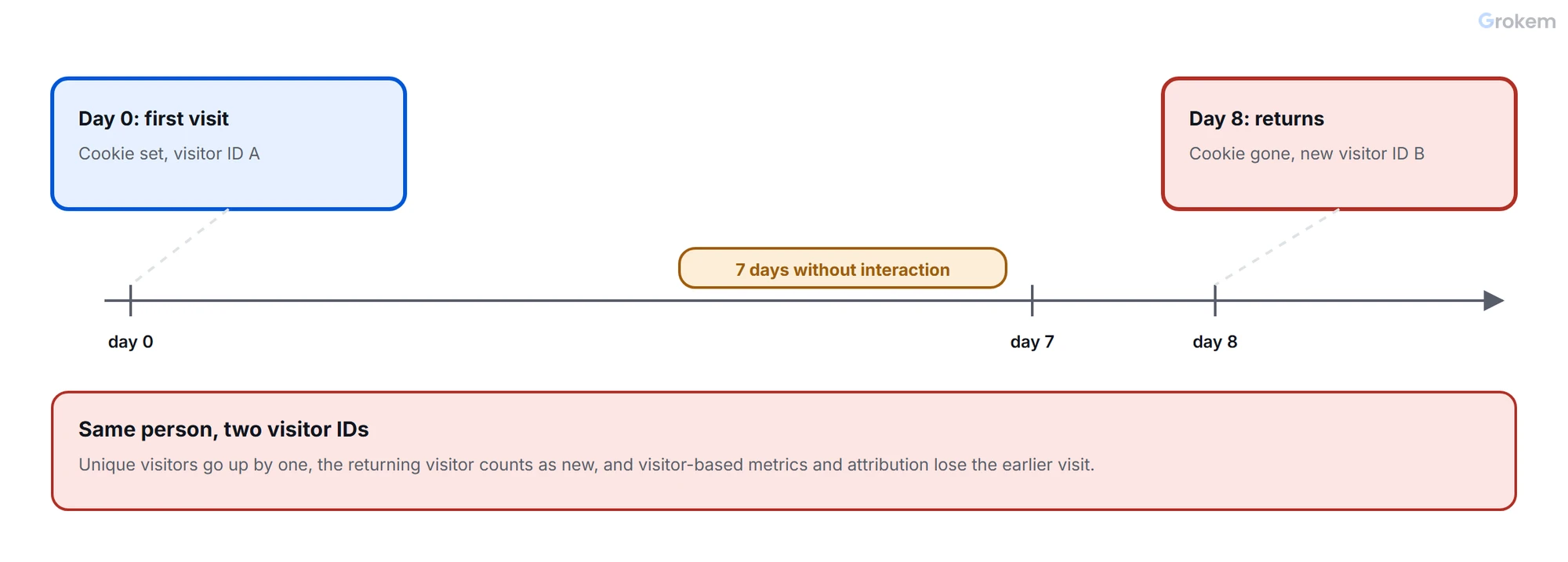
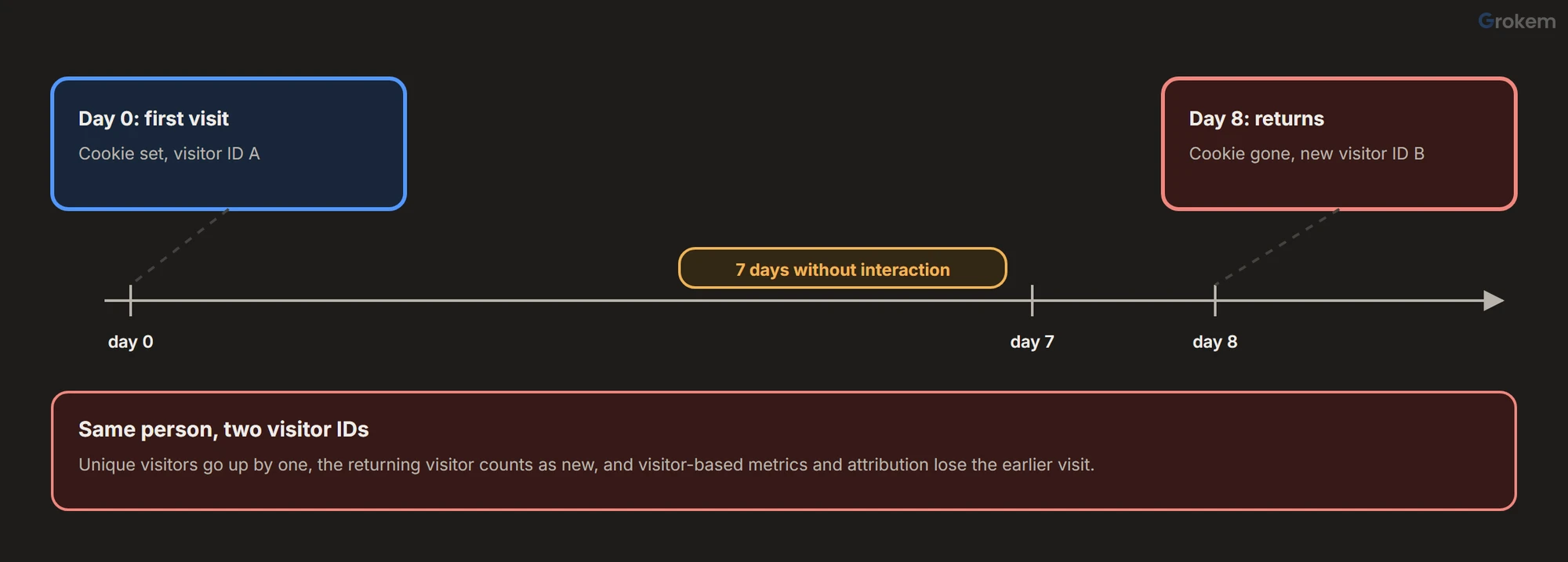
The consequences are the ones in Adobe's list:
- Visitor counts rise, because returning visitors are counted as new.
- Visitor-based metrics move, for example sales per visitor.
- Attribution weakens, because activity after the cookie expired cannot be tied to the earlier visit.
Metrics that are counted per hit, such as page views and orders, do not depend on the visitor cookie, so they should not move for this reason. That is a consequence of how they are counted, not a statement from Adobe's page.
How to see it in your own data
This is a way to look, not an Adobe procedure. Compare the same period, by browser:
- In Workspace, build a table with Unique Visitors, Visits and the share of new visitors, broken down by Browser.
- Compare Safari with Chrome. If the effect is present, Safari shows more unique visitors per visit and a higher new-visitor share than a browser without the cap, for the same audience.
- Look at the trend around Safari releases and around the dates in the timeline above. A step that appears on one date in Safari only points to a browser change, not a tagging change.
- Check the return gap: if returning visitors in Safari almost vanish between day seven and day eight, the cap is the likely cause.
Adobe's cookie page suggests the reporting-level answer for comparisons: use a segment that filters out the affected users when you need figures that are not distorted.
What does not remove the cap
- A longer cookie lifetime in your library settings. The cap is applied by the browser, so a longer value set in the library does not extend the life of a cookie Safari limits. This follows from how ITP works rather than from a statement on Adobe's page; test it in Safari if you need proof for your site.
- A first-party tracking server through a CNAME. It is the standard way to make Analytics requests look like they come from your own domain, and the tracking-server setup is worth doing for other reasons. But Adobe's page lists CNAME implementations as affected since November 2020, and WebKit caps cookies set through detected third-party cloaking at seven days. Treat a CNAME as a prerequisite for first-party collection, not as a cure for the seven-day limit. Adobe's page also says that if you use the same CNAME for several domains, the cookie is treated as third-party on the others.
What Adobe says you can do
Adobe's page on options to mitigate browser cookie limitations lists these, with their own conditions:
| Option | What it does | Condition on Adobe's page |
|---|---|---|
| Cross-Device Analytics | Uses alternate identifiers for visitors, moving reporting from a device view to a person view | Available to Analytics Ultimate customers |
| Customer Journey Analytics | Combines data by a common customer ID | An add-on for Select, Prime and Ultimate customers |
| Server-side collection with your own identifier | You provide the identifier instead of relying on browser cookies | Sent with the Data Insertion API or the Bulk Data Insertion API; Adobe recommends the Bulk API for new server-side setups |
| First-party device ID with the Web SDK | You set and manage your own device identifier instead of an Adobe-generated ECID | Needs the Experience Platform Web SDK |
Each of these moves identity off the browser's cookie: a signed-in ID, your own server, or a device ID you control. None is a setting you switch on in the Analytics extension. Which fits depends on what you license and how many of your visitors sign in.
A practical plan
- Measure first. Run the browser comparison above and write down the size of the gap.
- Report it. Annotate dashboards where visitor counts are shown, and keep a segment for Safari so analysts can compare like with like.
- Prefer hit-based metrics for Safari comparisons: visits, page views and orders.
- Choose an identity option from the table only if the gap is large enough to matter for decisions. Weigh the licence and the privacy review that identifying people brings.
- Re-check each year. ITP's rules change over time, so the dates and caps here can change; WebKit's tracking-prevention page is the reference for the current rules.
Glossary
- ITP
- Intelligent Tracking Prevention, Safari's set of limits on cookies and other storage that can be used to track visitors across sites.
- ECID
- The Experience Cloud ID, the visitor identifier set by the Visitor ID Service library in the AMCV cookie.
- AMCV cookie
- The first-party cookie in which the Visitor ID Service library stores the ECID.
- CNAME
- A DNS record that makes a subdomain of your site point to another host, used to send data collection requests through your own domain.
- First-party cookie
- A cookie set for the site the visitor is on, as opposed to a third-party cookie set by another domain.
Frequently asked questions
Does ITP change page views or orders?
Counts per hit, such as page views and orders, do not depend on the visitor cookie, so they should not move for this reason. Visitor counts and metrics based on visitors do. This follows from how the metrics are counted, not from a statement on Adobe's page.
Do other browsers behave like Safari?
Adobe's page speaks of ITP-impacted browsers, with Safari as the example. Check each browser's own tracking-prevention policy, because the rules differ and change.
Will a first-party tracking server through a CNAME fix it?
Not on its own. Adobe's page lists CNAME implementations as affected since November 2020, and WebKit caps cookies set in a response at seven days when it detects third-party CNAME or IP address cloaking. A CNAME is a prerequisite for first-party collection, not a cure for the cap.
Which Adobe cookies does Safari limit?
Adobe names AMCV cookies set by the Visitor ID Service library, and the legacy s_vi and s_fid cookies. The page's cookie table is an image, so check it on the page for the complete list.
How can I tell if my visitor counts are affected?
Compare Safari with another browser for the same period: unique visitors per visit and the share of new visitors. A higher figure in Safari only, and a step that begins on one date, points to the cap. This is a suggested method, not an Adobe procedure.
Next steps
- Set up the first-party tracking server correctly: [multi-suite tagging and the tracking server](https://www.grokem.com/data/data-analytics/tag-management/implement-multi-suite-tagging-in-adobe-launch-
- Check other causes of unexplained visitor changes: [Adobe Launch audit](https://www.grokem.com/data/data-analytics/tag-management/adobe-launch-audit-step-by-step-property-review-with-scorecard)
- Remember that consent choices change counts too: [consent in Adobe Launch](https://www.grokem.com/data/data-analytics/tag-management/consent-in-adobe-launch-for-adobe-analytics-how-opt-in-approve-and-
References
- Adobe Analytics and browser cookies – Adobe
- Tracking Prevention in WebKit – WebKit
- Options to mitigate the effect of browser cookie limitations – Adobe
- Apple Intelligent Tracking Prevention (ITP) 2.x – Adobe Target
- Adobe-managed certificate program – Adobe
- Visitor identification using the Adobe Analytics tag extension – Adobe
From Grokem: https://www.grokem.com/data/data-analytics/tag-management/safari-itp-and-adobe-analytics-why-visitor-counts-rise-and-what-you-can-do