
Two things go wrong when Adobe Target is deployed through Adobe Launch (Tags). Visitors see the original page for a moment before the personalized one replaces it, or the page stays blank for seconds. And Analytics for Target reports come up empty because the libraries ran in the wrong order. Both come down to what is in the page's head, and in what order.
This guide explains the pre-hiding snippet, where it has to sit when the library is loaded by Tags, the order the Adobe libraries must run in for Analytics for Target (A4T), and a script that checks a page's head for both. It covers the web with at.js; the Web SDK is out of scope.
Why the page flickers
Adobe's page on how at.js manages flicker describes it plainly: default content is displayed for a moment before it is replaced by the activity content. Loading at.js asynchronously avoids blocking the page, but makes the flicker likelier, and that is the case a Tags deployment is in.
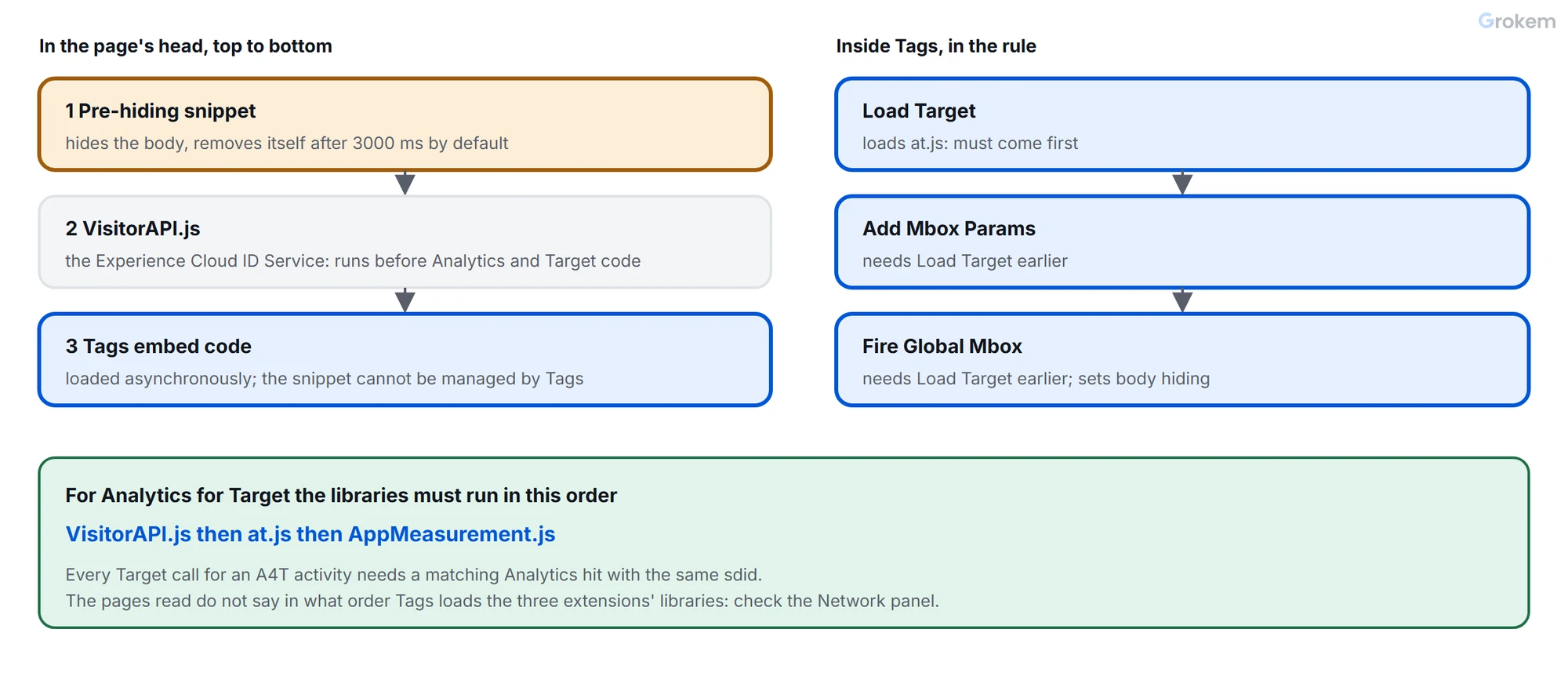
The remedy is the pre-hiding snippet. By default it hides the whole HTML body with a style that has the id at-body-style, and it removes that style itself after a timeout. The default timeout is 3000 ms, a value you can change in the snippet. You can also limit the hiding to specific regions by changing the style it applies. Get the code from Adobe's page rather than from a copy, so you have the current version.
Two consequences follow from how it works:
- The worst case is a blank page. The body stays invisible until personalized content is applied or the timeout ends, so if Target is slow or blocked, visitors see nothing for up to the timeout, 3 seconds by default.
- The snippet and at.js each manage visibility. For the global mbox that at.js creates itself, Adobe says it sets the body's opacity to 0 on load and resets it to 1 after Target responds or on a request error.
Where the snippet goes when Tags loads Target
The snippet must run before the library that shows personalized content. Adobe's pages give three placements:
| How Target is loaded | Where the snippet goes |
|---|---|
| at.js embedded directly in the page | Before at.js |
| at.js loaded through a tag manager that loads asynchronously | Before the tag manager's embed code |
| at.js loaded through a tag manager that loads synchronously | Placed so it runs first, since the tag manager's script might include at.js before the snippet runs |
For the Adobe Target extension, Adobe's page adds two things. The snippet must be added before loading the tag header embed code. And tags cannot manage it: the code must be added to the page directly, not created by a rule. So the snippet is the one piece of a Target setup that lives in your page templates, not in Tags, and it is easily lost in a template change nobody tells the analytics team about.
What the Tags side looks like
The Target extension requires at.js; it does not support mbox.js. Its settings include a Timeout (ms) whose default is 3000, which Adobe's page says might differ from the timeout set in the Target interface. Do not confuse it with the snippet's own timeout: they are separate numbers in separate places, and the visitor can wait for whichever is longer.
The extension's actions, as Adobe's page names them:
| Action | What it does |
|---|---|
| Load Target | Loads at.js into the page; needs no configuration |
| Add Mbox Params / Add Global Mbox Params | Add parameters to all mbox requests or only the global one; Load Target must be used earlier |
| Fire Global Mbox | Fires the global mbox and sets body hiding options; Load Target must be used earlier |
So within the rule, the order of actions matters: Load Target first, then the parameters, then the mbox. If a Fire Global Mbox does nothing, check that Load Target runs before it.
Library order for Analytics for Target
Analytics for Target (A4T) reports Target activities in Adobe Analytics. Adobe's prerequisites page gives the order of operations, in the order the libraries must run:
VisitorAPI.js(the Experience Cloud ID Service)at.jsAppMeasurement.js
The page adds that the Visitor ID service must execute before your Analytics and Target page code, and gives minimum versions: without redirect offers, VisitorAPI.js 1.8.0, at.js 0.9.1 and AppMeasurement.js 1.7.0; with redirect offers, VisitorAPI.js 2.3.0, at.js 1.6.2 and AppMeasurement.js 2.1. It also warns that at.js 1.8.0 and later, and 2.x, no longer work with Visitor API versions older than 2.5.0 for passing Audience Manager parameters.
The part that makes A4T work is the supplemental data ID (SDID). Every Target call that delivers content or records a goal for an A4T activity must have a matching Analytics hit sharing that ID. It appears as the sdid parameter in the Debugger, and when reports are empty, the first thing to confirm is that the Analytics hits carry it.
The pages read for this guide do not say in what order Tags loads the libraries of the three extensions. Do not assume it: check the order in the Network panel, and the sdid on the Analytics hit.
Step 1 of 2: Check the head of the page
This script reads a page (or a saved HTML file) and reports the order of the five things that matter: the pre-hiding snippet, VisitorAPI.js, your Launch embed code, at.js and AppMeasurement.js. It flags the two problems described above. Save it as check-load-order.mjs:
// check-load-order.mjs
// Usage: node check-load-order.mjs <page address or saved HTML file> [part of your Launch embed address]
import fs from 'node:fs';

const [source, launchPart = 'assets.adobedtm.com'] = process.argv.slice(2);
if (!source) {
  console.error('Usage: node check-load-order.mjs <page address or HTML file> [part of your Launch embed address]');
  process.exit(2);
}

const html = fs.existsSync(source) ? fs.readFileSync(source, 'utf8') : await (await fetch(source)).text();
const escape = (text) => text.replace(/[.*+?^${}()|[\]\\]/g, '\\$&');
const scriptWith = (part) => new RegExp(`<script[^>]+src=["'][^"']*${part}`, 'i');

const found = [
  ['pre-hiding snippet', /at-body-style/],
  ['VisitorAPI.js', scriptWith('VisitorAPI')],
  ['Launch embed code', scriptWith(escape(launchPart))],
  ['at.js', scriptWith('at(\\.min)?\\.js')],
  ['AppMeasurement.js', scriptWith('AppMeasurement')],
]
  .map(([name, pattern]) => {
    const match = html.match(pattern);
    return match && { name, index: match.index, line: html.slice(0, match.index).split('\n').length };
  })
  .filter(Boolean)
  .sort((a, b) => a.index - b.index);

console.log(`Order in the page (${source}):`);
found.forEach((item, i) => console.log(`  ${i + 1}. ${item.name} (line ${item.line})`));
if (!found.length) {
  console.log('  none of the five was found: nothing to check.');
  process.exit(0);
}

const at = (name) => found.find((item) => item.name === name)?.index;
const problems = [];
const snippet = at('pre-hiding snippet');
const launch = at('Launch embed code');
const atjs = at('at.js');

if (snippet === undefined) {
  console.log('No pre-hiding snippet found: fine if the page does not use Target, otherwise expect flicker.');
} else {
  if (launch !== undefined && snippet > launch) problems.push('The pre-hiding snippet comes after the Launch embed code. It must come before.');
  if (atjs !== undefined && snippet > atjs) problems.push('The pre-hiding snippet comes after at.js. It must come before.');
}
const visitor = at('VisitorAPI.js');
const appMeasurement = at('AppMeasurement.js');
if (visitor !== undefined && atjs !== undefined && visitor > atjs) problems.push('VisitorAPI.js comes after at.js. For Analytics for Target the order is VisitorAPI.js, at.js, AppMeasurement.js.');
if (atjs !== undefined && appMeasurement !== undefined && atjs > appMeasurement) problems.push('at.js comes after AppMeasurement.js. For Analytics for Target the order is VisitorAPI.js, at.js, AppMeasurement.js.');

if (problems.length) {
  problems.forEach((p) => console.log(`PROBLEM: ${p}`));
  process.exit(1);
}
console.log('No ordering problems found.');
Run it on a page of your own, giving a part of your Launch embed address as the second argument if it is not hosted at assets.adobedtm.com (Adobe's page names that domain for Adobe-managed builds):
node check-load-order.mjs https://www.example.com/
It reads the page source as the server sends it, so it sees the snippet and the embed code in the order a browser will meet them, but not scripts that other scripts add later. It was run on Node.js 22.11.0 on four sample pages:
| Sample page | Result |
|---|---|
| Snippet, then VisitorAPI.js, then the Launch embed code | No ordering problems found., exit code 0 |
| The Launch embed code, then the snippet | PROBLEM: The pre-hiding snippet comes after the Launch embed code. It must come before., exit code 1 |
| Snippet, at.js, VisitorAPI.js, AppMeasurement.js | PROBLEM: VisitorAPI.js comes after at.js. For Analytics for Target the order is VisitorAPI.js, at.js, AppMeasurement.js., exit code 1 |
| Launch embed code only | No pre-hiding snippet found: fine if the page does not use Target, otherwise expect flicker., exit code 0 |
For a page that has none of the five, it prints that there is nothing to check.
Step 2 of 2: Check what the browser does
The script checks the markup. Confirm the behaviour with a throttled load: in the browser's developer tools, slow the network, reload the page and watch whether the original content shows before the personalized content. Then block the Target request and note how long the page stays hidden: it should be the snippet's timeout and no longer.
Single-page applications
Adobe's page separates the two ways of requesting content in at.js 2.x. With triggerView(), flicker management is built in: at.js pre-hides the location where the view appears before applying targeted content. With the low-level getOffer() and applyOffer(), there is no built-in control: you hide the element yourself before the call and restore it in the success and error callbacks. Adobe's example sets the document element's opacity to 0 before the call and to 1 in both callbacks. Forgetting the error callback leaves the page blank when a request fails.
Troubleshooting
| Problem | Likely cause | Fix |
|---|---|---|
| The original content still shows for a moment although the snippet is on the page. | The snippet comes after the Tags embed code or after at.js, so the library can run before the page is hidden. | Move the snippet above the embed code and above at.js, and run the order checker on the page. |
| The page stays blank for about three seconds. | Target is slow or blocked. The snippet hides the body and removes its own style only after its timeout, which is 3000 ms by default. | Find why Target is slow. If you shorten the timeout in the snippet, weigh the flicker you accept against the wait. |
| The whole page is hidden although only one block is personalized. | By default the snippet pre-hides the whole HTML body. | Replace the style the snippet applies with selectors for the regions that are personalized. |
| Fire Global Mbox or an Add Mbox Params action does nothing. | Adobe's page says Load Target must be used earlier; without it at.js has not been loaded. | Run Load Target first in the rule, then the parameter actions, then Fire Global Mbox. |
| Analytics for Target reports are empty. | The libraries ran in the wrong order, or the Analytics hits do not carry the supplemental data ID that the Target calls used. | Check VisitorAPI.js, at.js, AppMeasurement.js in that order, and the sdid parameter on the Analytics hits in the Debugger or the Network panel. |
| A rule that adds the pre-hiding snippet has no effect. | Adobe's page says the snippet cannot be managed by tags and must be added to the page directly. | Add the snippet to the page template, before the Tags header embed code. |
| On a single-page application, content flickers when using getOffer and applyOffer. | Adobe's page says these low-level calls have no built-in flicker management. | Hide the element before the call and restore it in both the success and the error callback. |
| Two timeouts disagree and nobody knows which one applies. | The Target extension has its own Timeout setting (default 3000 ms, which Adobe's page says may differ from the Target interface), separate from the snippet's timeout. | Record both numbers where the team can find them; the visitor can wait for whichever is longer. |
Frequently asked questions
Is the pre-hiding snippet part of the Target extension?
No. Adobe's page says Tags cannot manage the snippet, and it must be added to the page directly, before the tag header embed code.
Can I change the three-second timeout?
Yes. Adobe's page shows the value as the last argument of the snippet's final call, and says to replace it to change the timeout. Weigh the flicker you accept against the time a visitor may wait.
Which at.js does the Tags extension use?
Adobe's page says the extension requires at.js and does not support mbox.js. It gives no version number.
Does this apply to the Web SDK?
This guide covers at.js. The Web SDK has its own setup, which the pages read for this guide do not cover.
References
From Grokem: https://www.grokem.com/data/data-analytics/tag-management/adobe-target-with-launch-pre-hiding-snippet-placement-and-library-order