
Before you start
4- A Tags (Adobe Launch) property whose rules use Custom Code actions, and a staging page that loads it
- The ability to change the page's Content-Security-Policy header or meta element, or a contact on the team that owns it
- Node.js (the script was tested on 22.11.0) and Playwright (tested on 1.63.0) for step 4
- Permission in Tags to edit the Core extension and data elements and to build libraries
A security team adds a Content Security Policy to the site, the Adobe Launch (Tags) library loads, and half the rules quietly stop doing anything. Nothing breaks on the page, because the browser blocks the code and moves on. The only place the failure shows is the browser console, and most people do not open it.
This guide sets out what a Content Security Policy has to allow for Tags, the two ways to allow the code that your rules run, how the nonce route works, and a script that lists what a policy blocks on a page so you can test it before the security team does. The script was run on stand-in pages for each kind of block.
What Tags needs from a policy
A Content Security Policy (CSP) is a rule set the browser enforces, sent as a Content-Security-Policy HTTP header or as a <meta> element in the head. Adobe's page on CSP support says the policy blocks, by default, the dynamically loaded scripts that Tags uses, and names two requirements:
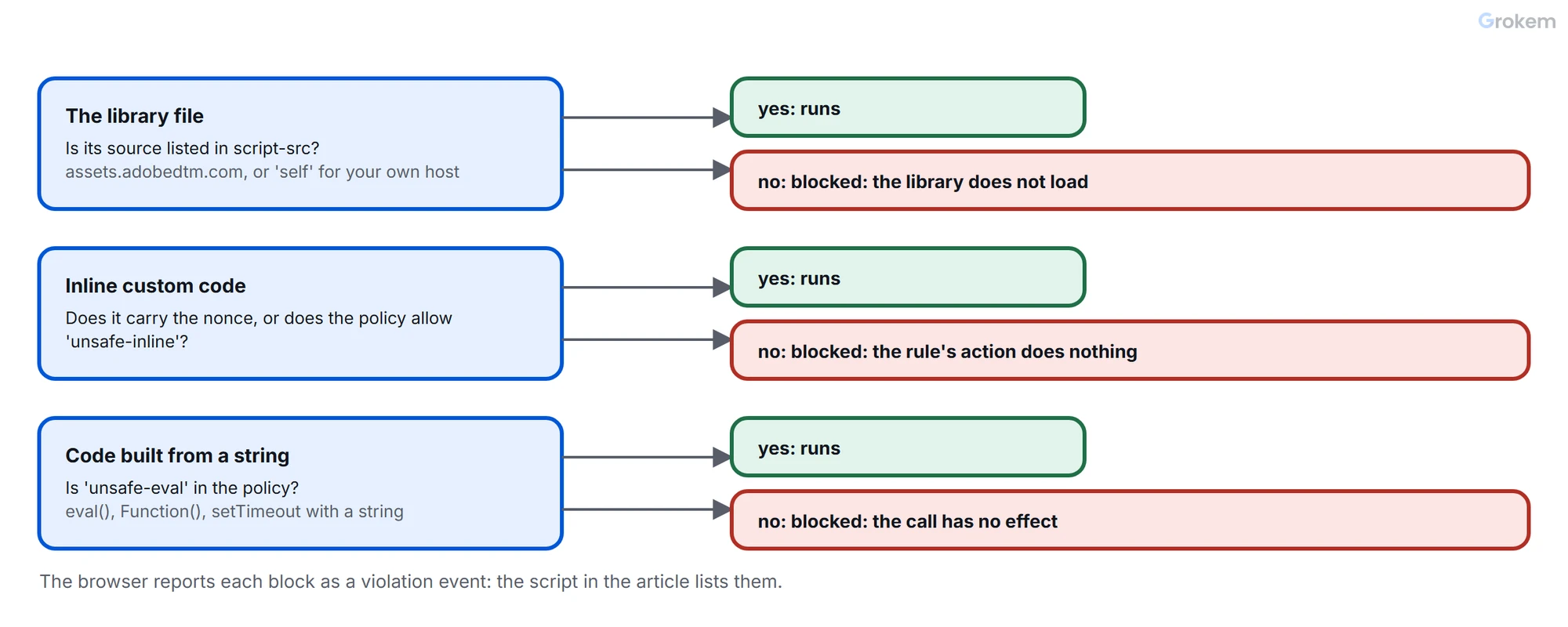
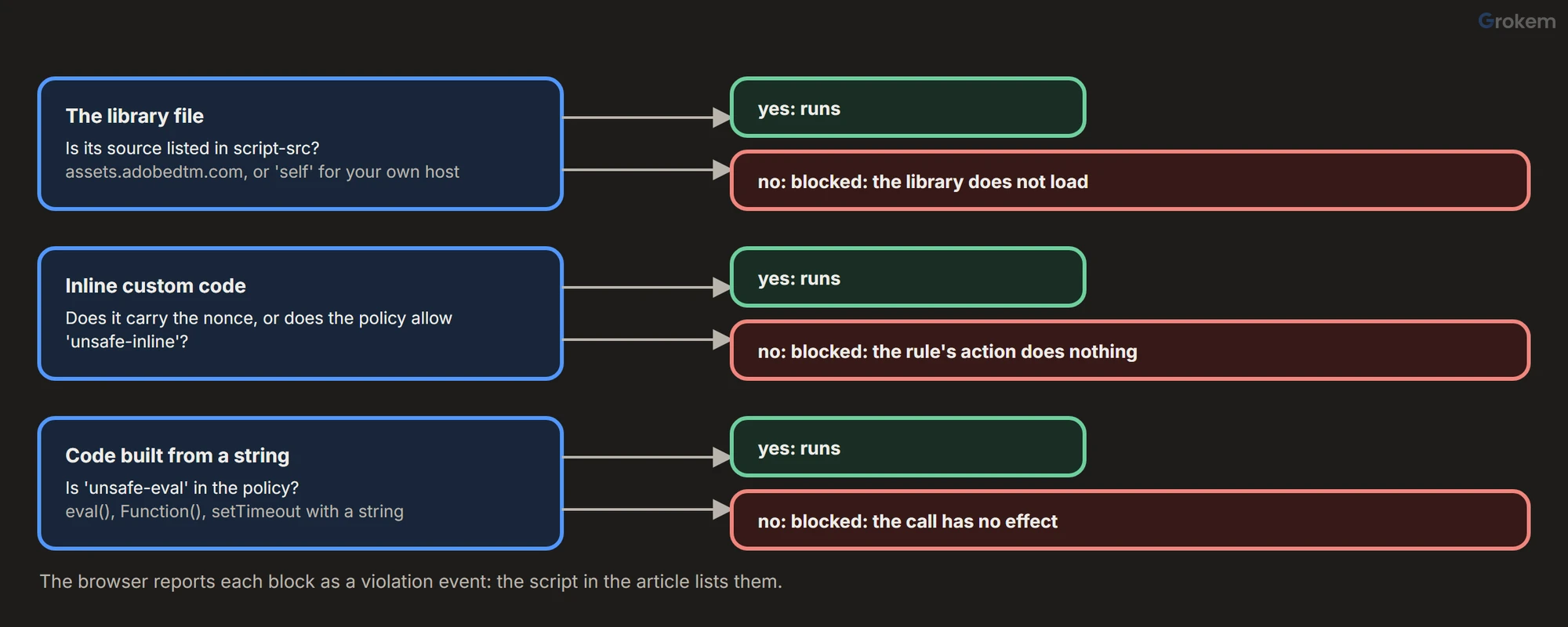
- The source of your tag library must be trusted. If it is not, the browser blocks the library and other required JavaScript.
- Inline scripts must be allowed. If they are not, Custom Code rule actions are blocked and do not run properly.
For a library you host yourself, 'self' is usually enough. For a library built and served by Adobe, the page says you also need assets.adobedtm.com in the policy, or the library will not load:
Content-Security-Policy: script-src 'self' assets.adobedtm.com
If you set the policy in a <meta> element, Adobe adds a condition: the library must be loaded asynchronously, because it does not work with a synchronous load.
Three ways to allow the code your rules run
Adobe describes the choices for inline scripts:
| Way | How it works | Adobe's view |
|---|---|---|
| A nonce | You generate a cryptographic nonce, put it in the policy and on every inline script | Better security |
'unsafe-inline' |
Every inline script is allowed | The least secure option, easier to implement and maintain |
| A hash | The policy lists a hash of each inline script | Mentioned, but not feasible with tag-management systems such as Tags |
Adobe does not say why hashes are not feasible; a likely reason is that the code of a rule is not fixed text, since it changes whenever someone edits the rule. That leaves the nonce and 'unsafe-inline'. The second one switches off the main protection a policy gives against injected scripts, so it is a fallback, not a setup.
Step 1 of 6: Choose the nonce route
Use a nonce if you can change how your pages are rendered, because the page has to carry a fresh value on every response. If you cannot, 'unsafe-inline' is what is left, and the security team should know that is what the policy now allows.
Step 2 of 6: Allow the library's source
Add the library's origin to script-src: 'self' for your own host, and assets.adobedtm.com for an Adobe-managed host. Do this first and test it alone, so that a library that does not load is not confused with code that is blocked later.
Step 3 of 6: Generate the nonce and pass it to Tags
MDN explains the mechanism. You generate a random value with a cryptographically secure generator and include it in the policy; the same value goes in the nonce attribute of each inline script that may run. The value has to be unique for every HTTP request, because a reused nonce protects nothing.
Content-Security-Policy: script-src 'self' assets.adobedtm.com 'nonce-2726c7f26c'
<script nonce="2726c7f26c">
  window.digitalData = { nonce: '2726c7f26c' };
</script>
Tags needs to know the value too, so it can put it on the inline scripts it creates. Adobe's page lists three steps:
- Create a data element that references where the nonce is located within your data layer.
- Configure the Core extension and specify which data element you used.
- Publish your data element and Core extension changes.
The page says to load the library asynchronously for this method, and that the nonce should change with every page load. It does not name the Core extension's setting, and the Core extension overview page lists no such option, so look for it in the extension's configuration screen.
Cached pages are a trap. If a content delivery network caches the HTML, every visitor gets the same nonce, and the protection is gone. Render the nonce on every response, or keep those pages out of the cache.
Step 4 of 6: Find out what is blocked
The browser reports each blocked script as an event on the page. This script loads a page, collects those events from the first script onward and prints them. Save it as csp-violations.mjs:
// csp-violations.mjs
// Usage: node csp-violations.mjs <page url>
//        node csp-violations.mjs            (no arguments: runs a stand-in page; CASE=inline|nonce|appended|eval)
import { chromium } from 'playwright';

const pageUrl = process.argv[2] ?? 'https://store.example.com/';
const demo = !process.argv[2];
const scenario = process.env.CASE ?? 'inline';

// A stand-in for a tag library that runs custom code in the four ways described in the article.
const LIBRARY = {
  inline: `const el = document.createElement('script'); el.textContent = 'window.customCode = "ran"'; document.head.appendChild(el);`,
  nonce: `const el = document.createElement('script'); el.nonce = window.digitalData.nonce; el.textContent = 'window.customCode = "ran"'; document.head.appendChild(el);`,
  appended: `const el = document.createElement('script'); el.textContent = 'window.customCode = "ran"'; document.head.appendChild(el);`,
  eval: `new Function('return 1')();`,
};
const POLICY = {
  inline: "script-src 'self' assets.example.net",
  nonce: "script-src 'self' assets.example.net 'nonce-abc123'",
  appended: "script-src 'self' assets.example.net 'nonce-abc123'",
  eval: "script-src 'self' assets.example.net",
};

const browser = await chromium.launch();
const page = await browser.newPage();

// Collect every violation the browser reports, from the first script on.
await page.addInitScript(() => {
  window.__violations = [];
  document.addEventListener('securitypolicyviolation', (e) => {
    window.__violations.push({ directive: e.effectiveDirective, blocked: e.blockedURI || 'inline', file: e.sourceFile, line: e.lineNumber, sample: e.sample });
  });
});

if (demo) {
  await page.route('https://store.example.com/', (route) => route.fulfill({
    status: 200,
    contentType: 'text/html',
    headers: { 'content-security-policy': POLICY[scenario] },
    body: `<!doctype html><title>Demo</title>
${POLICY[scenario].includes('nonce-') ? `<script nonce="abc123">window.digitalData = { nonce: 'abc123' };</script>` : ''}
<script async src="https://assets.example.net/launch-demo.min.js"></script><h1>Demo</h1>`,
  }));
  await page.route('https://assets.example.net/**', (route) => route.fulfill({ status: 200, contentType: 'text/javascript', body: LIBRARY[scenario] }));
}

await page.goto(pageUrl, { waitUntil: 'load' });
await page.waitForLoadState('networkidle');
await page.waitForTimeout(500);
const violations = await page.evaluate(() => window.__violations);
await browser.close();

if (!violations.length) {
  console.log(`No Content Security Policy violations on ${pageUrl}.`);
  process.exit(0);
}
console.log(`${violations.length} Content Security Policy violation(s) on ${pageUrl}:`);
console.table(violations.map((v) => ({ directive: v.directive, blocked: v.blocked, file: v.file, line: v.line, sample: (v.sample || '').slice(0, 40) })));
process.exit(1);
Install Playwright as in the Playwright guide, then run it on a page of your own site, which is the useful use:
node csp-violations.mjs https://staging.example.com/
With no address it runs a stand-in page and a stand-in library that runs custom code in one of four ways, chosen with CASE. It was run on Node.js 22.11.0 with Playwright 1.63.0. The four results:
CASE |
Policy | Library does | Result |
|---|---|---|---|
inline |
script-src with no nonce |
Adds an inline script | 1 violation: script-src-elem, blocked inline |
nonce |
With the nonce | Adds an inline script carrying the nonce | None, exit code 0 |
appended |
With the nonce | Adds an inline script without the nonce | 1 violation: script-src-elem, blocked inline |
eval |
script-src with no 'unsafe-eval' |
Calls new Function(...) |
1 violation: script-src, blocked eval |
The output for the first case looks like this:
1 Content Security Policy violation(s) on https://store.example.com/:
┌─────────┬───────────────────┬──────────┬─────────────────────────────────────────────────┬──────┬────────┐
│ (index) │ directive         │ blocked  │ file                                            │ line │ sample │
├─────────┼───────────────────┼──────────┼─────────────────────────────────────────────────┼──────┼────────┤
│ 0       │ 'script-src-elem' │ 'inline' │ 'https://assets.example.net/launch-demo.min.js' │ 1    │ ''     │
└─────────┴───────────────────┴──────────┴─────────────────────────────────────────────────┴──────┴────────┘
The file column is the most useful one: it names the script that tried to run the blocked code. The script exits with 1 when it finds a violation, so it can run after every library publish.
Step 5 of 6: Fix each kind of block
| What the table shows | Why | What to do |
|---|---|---|
script-src-elem, inline, and the policy has no nonce |
Custom code is inline and nothing allows it | Add the nonce (step 3) or, as a fallback, 'unsafe-inline' |
script-src-elem, inline, and the policy has a nonce |
The code appends an inline script and the nonce is not on it. Adobe's page says that when an inline script is appended to the DOM the tag cannot add the nonce correctly | Rewrite the custom code so it does not build inline scripts, or move it to a file served from an allowed source |
script-src, eval |
Code is built from a string with eval() or Function(). MDN says these are blocked unless 'unsafe-eval' is in the policy |
Rewrite the code. Adobe's page does not mention these calls, so check your own custom code for them |
A blocked address instead of inline |
A script loaded from a source the policy does not list | Add the source, if you trust it, or remove the tag that loads it |
One limit applies to all of it: Adobe says the nonce only handles loading your custom code, not what the code does. If an inline script contains code that does not comply with your policy, the policy takes precedence.
Step 6 of 6: Test every kind of page
Run the script on each page type the property serves: home, article, checkout, a page with a consent banner. A violation that appears on only one of them points to a rule that runs there. Do it on the development or staging library first, and again after each publish.
Two more things to know
- Subresource Integrity. Adobe's page says SRI has major limitations with tag-management systems and points to a separate compatibility guide. Read it before asking for SRI on the library.
'strict-dynamic'. MDN explains that it passes the trust given to a script with a nonce or hash on to the scripts it loads, and that allowlists and'unsafe-inline'are then ignored. Adobe's page does not discuss it, so test your property with a policy that uses it before relying on it.
Keeping it working
The policy belongs to the security team and the rules belong to the analytics team, so changes on one side break the other. Put the script into your release checklist, and add its first scenario to the Launch audit as an extra check of the Custom Code actions.
Expected result
`node csp-violations.mjs <your page>` prints `No Content Security Policy violations on <your page>.` and exits with 0. On the stand-in page the four scenarios give one violation each for `inline`, `appended` and `eval`, and none for `nonce`. Custom Code actions run on the page and the library loads from an allowed source.
Troubleshooting
| Problem | Likely cause | Fix |
|---|---|---|
| The library does not load at all under the policy. | The library's source is not trusted. For an Adobe-managed build Adobe's page says assets.adobedtm.com must be listed in script-src. | Add the library's origin to script-src: 'self' for your own host, and assets.adobedtm.com for an Adobe-managed host. |
| The library loads but Custom Code actions do nothing. | Inline scripts are not allowed, so the browser blocks the code that rule actions run. | Allow inline scripts with a nonce (better), or with 'unsafe-inline' as the least secure fallback. |
| The policy has a nonce and custom code is still blocked. | The code appends an inline script to the DOM. Adobe's page says the tag cannot add the nonce correctly in that case. | Rewrite the custom code so it does not build inline scripts, or serve it from a file at an allowed source. |
| A policy set in a meta element blocks the library. | Adobe's page says the meta-element approach does not work with a synchronous load of the tag library. | Load the library asynchronously, or send the policy as an HTTP header. |
| Code works on some pages and is blocked on others. | Some pages are cached with an old nonce, or do not render the nonce at all. A nonce has to be unique for every response. | Render a fresh nonce on every response, or keep those pages out of the cache. |
| A violation names eval as the blocked item. | Code is built from a string with eval() or Function(). MDN says these are blocked unless 'unsafe-eval' is in the policy. | Rewrite the code. Adobe's page does not mention these calls, so search your own custom code for them. |
| The data element that should hold the nonce is empty. | A data element is read when it is used. If the nonce is not in the data layer yet at that moment, it returns nothing. | Put the nonce in the page before the library runs. Rule timing is explained in the guide linked in the next steps. |
| The nonce is the same on every page load. | Adobe's page says the nonce should change with each page load. A fixed value gives no protection. | Generate it per request on the server and pass the same value to the policy, the inline scripts and the data layer. |
Frequently asked questions
Can I allow Tags with hashes instead of a nonce?
Adobe's page mentions hashes and says the approach is not feasible with tag-management systems such as Tags. A likely reason is that a rule's code changes whenever someone edits it, but Adobe does not say.
Does a nonce make my custom code safe?
No. Adobe says the nonce only handles loading the custom code, not what the code does. If an inline script contains code that does not comply with your policy, the policy takes precedence.
What about Subresource Integrity?
Adobe's page says SRI has major limitations with tag-management systems and points to a separate compatibility guide. Read it before asking for SRI on the library.
Does the script work on any site?
Yes. Given an address it loads the page, collects the browser's violation events and prints them. With no address it runs a stand-in page for four scenarios. It reports what the page's policy blocks, whichever tags are involved.
Next steps
- Understand why a data element can be empty when a rule runs: [rule timing](https://www.grokem.com/data/data-analytics/tag-management/why-an-adobe-launch-data-element-is-empty-rule-timing-and-order-exp
- Add the script to your release checks: [release and rollback runbook](https://www.grokem.com/data/data-analytics/tag-management/adobe-launch-release-and-rollback-permissions-environments-and-a-runbook
- Review the property's Custom Code actions: [Adobe Launch audit](https://www.grokem.com/data/data-analytics/tag-management/adobe-launch-audit-step-by-step-property-review-with-scorecard)
References
From Grokem: https://www.grokem.com/data/data-analytics/tag-management/adobe-launch-under-a-content-security-policy-nonces-inline-code-and-what-to-test