
Before you start
5- Two or more domains you own, each running a Tags property with the Experience Cloud ID Service extension, in the same Experience Cloud organization
- VisitorAPI.js 1.7.0 or higher, which Adobe lists as the minimum for appendVisitorIDsTo
- Permission in Tags to edit rules and to build libraries
- For step 5: Node.js (the code was tested on 22.11.0) and Playwright (tested on 1.63.0)
- A browser that blocks third-party cookies, for the check in step 6
A visitor reads your shop on one domain, follows a link to your payment or help domain, and Adobe Analytics counts two visitors. Each domain keeps its own cookies, so the second one has not seen this person before and gives them a new Experience Cloud ID (ECID). Visits split, funnels break between the two sites, and unique visitors rise.
The fix is a handoff: the first page puts the visitor's ECID into the link, and the Visitor ID Service on the destination page reads it. This guide sets that up in an Adobe Launch (Tags) property that uses the Adobe Analytics extension and the standalone Experience Cloud ID Service extension, tests it with Playwright, and lists what can still go wrong. The Web SDK has its own command for the same job, which is only mentioned at the end.
What gets passed
Adobe's reference for appendVisitorIDsTo says the function lets you share a visitor's ECID across domains when browsers block third-party cookies. It needs VisitorAPI.js 1.7.0 or higher, the Visitor ID Service must be implemented, and you must own both the source and the destination domains.
The function adds a parameter named adobe_mc to the destination address. According to Adobe's knowledge-base article, it holds four items in an encoded form, separated by a pipe character:
| Item | What it is |
|---|---|
MCMID |
The Experience Cloud ID |
MCAID |
The Analytics tracking ID |
MCORGID |
The Experience Cloud organization ID |
TS |
The time stamp of the request |
The shape it gives is adobe_mc=MCMID=…|MCAID=…|MCORGID=…%40AdobeOrg|TS=…, and it adds that the parameter may be missing depending on the visitor's browser settings, and Adobe's reference warns that cross-domain tracking will not work as intended if the ECID was rejected initially or previously.
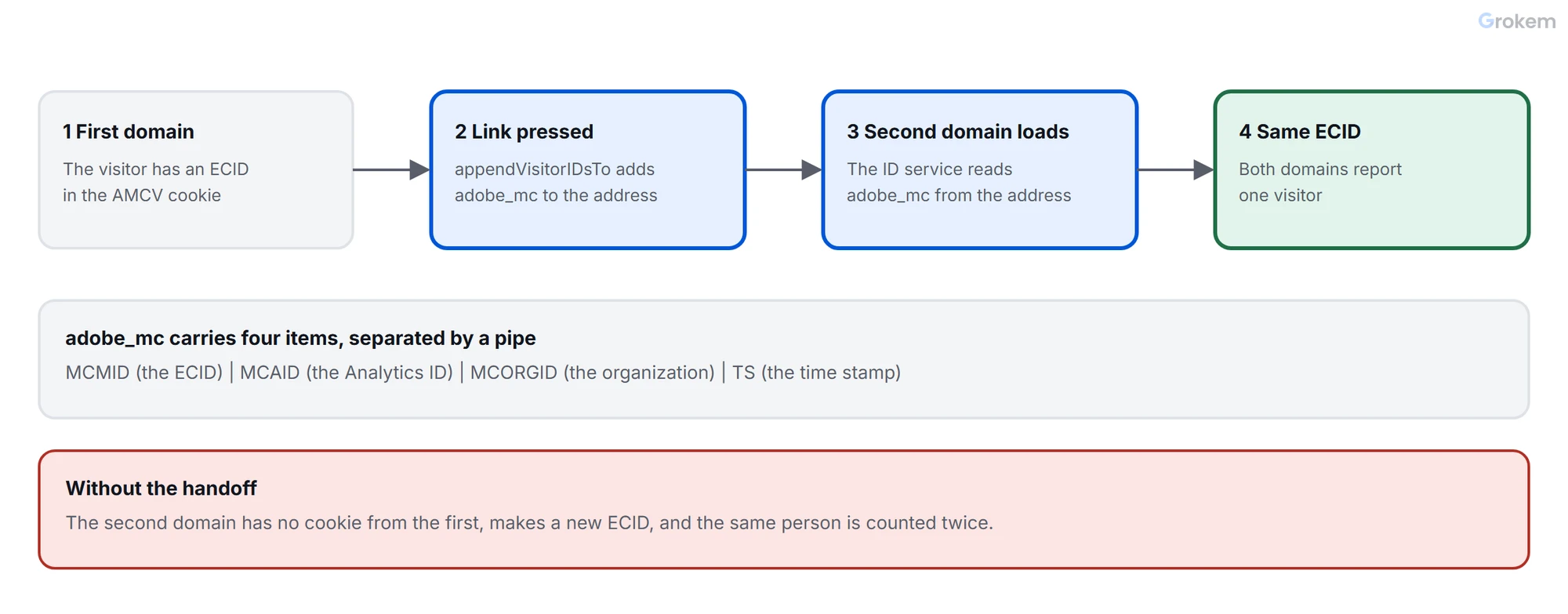
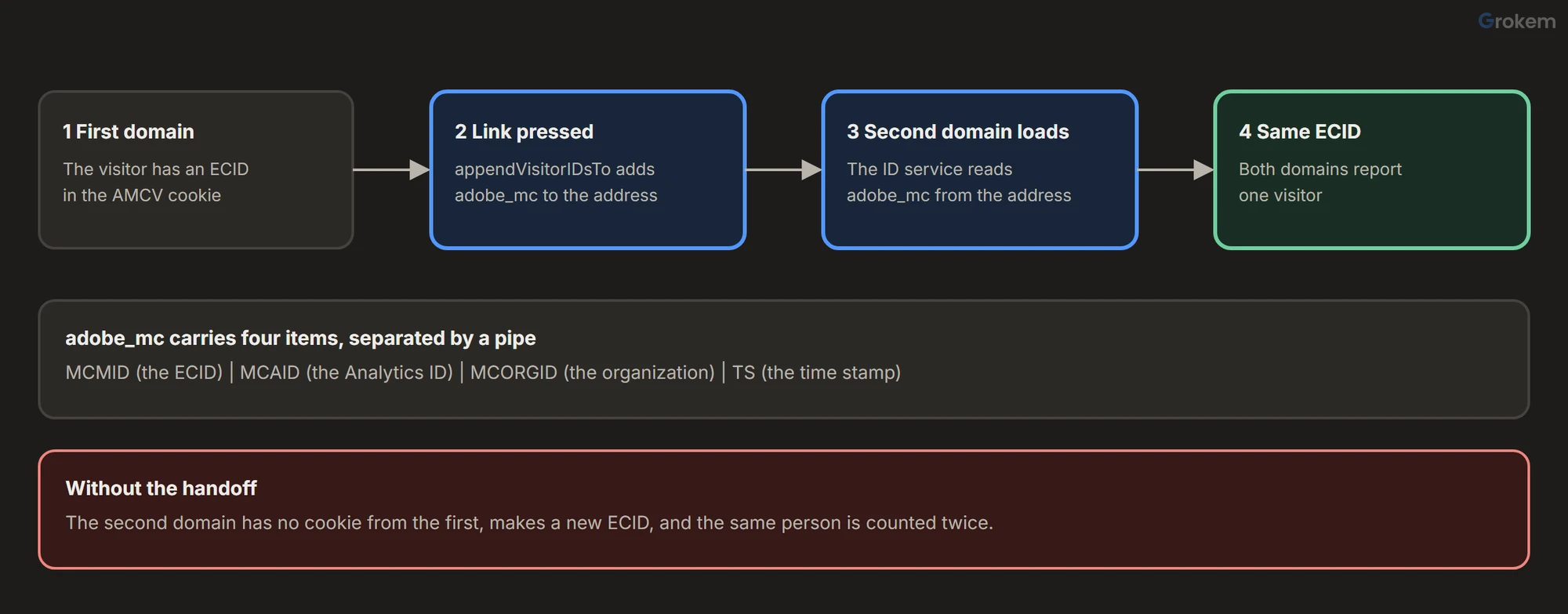
The destination does nothing special: Adobe's page says the Visitor ID Service code on the destination domain extracts the ID from the address. What it needs is the Visitor ID Service itself, in the same Experience Cloud organization, because the parameter carries the organization ID.
One expiry detail is worth knowing. Adobe's page for the Web SDK version of this handoff says the adobe_mc parameter expires after five minutes. The Visitor API pages read for this guide state no expiry, so assume the value ages and add it when the visitor clicks, not when the page loads.
Step 1 of 6: List the domains and the links
Write down every domain you own that a visitor can move to, and which pages link to them. Only links between domains you own can carry the ID: Adobe's reference is explicit about that, and a link to a partner or a payment provider you do not own is not a case for it. Keep the list short and exact; the code below matches links by domain name.
Step 2 of 6: Check both domains run the ID service
The Analytics extension depends on the standalone Experience Cloud ID Service extension to collect the ECID. In a Tags property, _satellite.getVisitorId() returns the Visitor ID Service instance when that extension is installed and published, and null when it is not. That makes it the safest way to reach the instance from your own code: the instance you get is the one the property already created, with its organization and settings.
Do this on every property involved. If the destination runs a different property, install the ID service extension there with the same organization ID.
Step 3 of 6: Add the rule that decorates the links
Create a rule named "Cross-domain - decorate links" with the event Window Loaded (the links must exist) and one Core - Custom Code action:
// Core - Custom Code action: pass the ECID to the other domains you own
var domains = ['pay.example.net', 'help.example.org'];
var visitor = _satellite.getVisitorId();

if (visitor) {
  var decorate = function (event) {
    var link = event.currentTarget;
    var original = link.getAttribute('data-original-href') || link.href;
    link.setAttribute('data-original-href', original);
    link.href = visitor.appendVisitorIDsTo(original);
  };

  domains.forEach(function (domain) {
    document.querySelectorAll('a[href*="' + domain + '"]').forEach(function (link) {
      link.addEventListener('mousedown', decorate);
      link.addEventListener('keydown', function (event) {
        if (event.key === 'Enter') decorate(event);
      });
    });
  });
}
This is adapted from the sample on Adobe's reference page, which the page says can be placed in the Custom Code editor of the Analytics extension. Three differences matter:
- It reaches the instance with
_satellite.getVisitorId()instead of creating one withVisitor.getInstance, so there is no organization ID or tracking-server list to repeat in the code. - It also listens for the Enter key. Adobe's sample listens for
mousedownonly. A visitor who tabs to a link and presses Enter does not produce amousedown, so that link would go out without the ID. - It remembers the original address. Without that, a second press on the same link would hand an already decorated address to the function again. The stand-in in the test below appends the parameter each time, so the test shows the effect; what the real function does with an address that already has the parameter is not documented, and this removes the question.
Adobe's sample also empties the MCAID value in the decorated address with a regular expression. The page does not say why. This guide leaves the value as the function returns it; if your property still relies on the Analytics ID cookie, ask Adobe's support which you should do.
Links that are added to the page after the rule has run are not decorated, because the listeners are attached once. For a single-page application, attach the listeners again when the route changes, or listen on the document and check the clicked link.
Step 4 of 6: Keep your own domains out of the exit report
A click from your shop to your payment domain is a click to another domain, so automatic exit link tracking records it as an exit. Adobe's reference for linkInternalFilters says a link that matches none of its values is treated as an exit link, and the Link Tracking section of the extension has an Outbound Links - Never Track field for domains that should never be tracked as exits (comma-separated, no spaces). Add the domains from step 1 there. Exit, download and custom link tracking covers the whole group of settings.
Step 5 of 6: Test the handoff
The test opens a source page, clicks or presses Enter on the link and checks three things: the destination address carries adobe_mc with the source's ECID and organization, the destination reports the same ECID in its Analytics request, and links that should not be decorated are left alone. It runs against two stand-in pages; the source page provides a stand-in for _satellite.getVisitorId() so your rule's code runs as it is. Save the rule's code from step 3 as decorate-links.js, then save this as handoff.test.mjs:
// handoff.test.mjs: run with  node --test
import { test, before, after } from 'node:test';
import assert from 'node:assert/strict';
import fs from 'node:fs';
import { chromium } from 'playwright';

const SOURCE = 'https://shop.example.com/';
const ORG = '0123456789ABCDEF01234567@AdobeOrg';
const GIF = Buffer.from('R0lGODlhAQABAIAAAAAAAP///yH5BAEAAAAALAAAAAABAAEAAAIBRAA7', 'base64');
const decorateLinks = fs.readFileSync(new URL('./decorate-links.js', import.meta.url), 'utf8');

// Stand-ins for the two sites. The source page fakes what the ID service extension provides: _satellite.getVisitorId().
const SOURCE_PAGE = `<!doctype html><title>Shop</title>
<a id="pay" href="https://pay.example.net/checkout">Pay</a>
<a id="about" href="/about">About</a>
<a id="other" href="https://other.example.com/">Other</a>
<script>
  const standIn = {
    getMarketingCloudVisitorID: () => '11111111111111111111',
    appendVisitorIDsTo: (url) => url + (url.includes('?') ? '&' : '?') + 'adobe_mc=' +
      encodeURIComponent('MCMID=11111111111111111111|MCORGID=${ORG}|TS=1790000000'),
  };
  window._satellite = { getVisitorId: () => standIn };
  new Image().src = 'https://data.example.com/b/ss/exgrpglobaldev,exstoredev/1/JS-2.22.0/s1?pageName=shop%3Ahome&mid=' + standIn.getMarketingCloudVisitorID();
</script>`;

// The destination reads adobe_mc and uses its ECID; without it, it makes a new one.
const DESTINATION_PAGE = `<!doctype html><title>Pay</title>
<script>
  const handoff = new URLSearchParams(location.search).get('adobe_mc');
  const parts = Object.fromEntries((handoff || '').split('|').map((p) => p.split('=')));
  const mid = parts.MCMID || '99999999999999999999';
  new Image().src = 'https://data.example.com/b/ss/exgrpglobaldev,expaydev/1/JS-2.22.0/s2?pageName=pay%3Acheckout&mid=' + mid;
</script>`;

let browser;
let page;
let beacons;

before(async () => {
  browser = await chromium.launch();
  page = await browser.newPage();
  await page.route('**/b/ss/**', (route) => route.fulfill({ status: 200, contentType: 'image/gif', body: GIF }));
  await page.route(SOURCE, (route) => route.fulfill({ status: 200, contentType: 'text/html', body: SOURCE_PAGE }));
  await page.route('https://pay.example.net/**', (route) => route.fulfill({ status: 200, contentType: 'text/html', body: DESTINATION_PAGE }));
  await page.route('https://other.example.com/**', (route) => route.fulfill({ status: 200, contentType: 'text/html', body: '<title>Other</title>' }));
  beacons = [];
  page.on('request', (request) => {
    const url = new URL(request.url());
    if (url.pathname.startsWith('/b/ss/')) beacons.push({ pageName: url.searchParams.get('pageName'), mid: url.searchParams.get('mid') });
  });
});

after(() => browser.close());

async function openSource() {
  beacons.length = 0;
  await page.goto(SOURCE);
  await page.addScriptTag({ content: decorateLinks });
}

const handoffOf = (url) => Object.fromEntries(decodeURIComponent(new URL(url).searchParams.get('adobe_mc') ?? '').split('|').map((p) => p.split('=')));

test('a click on a link to the other domain carries the ECID, and the destination keeps it', async () => {
  await openSource();
  await Promise.all([page.waitForURL(/pay\.example\.net/), page.click('#pay')]);
  await page.waitForRequest((request) => request.url().includes('pageName=pay%3Acheckout')).catch(() => {});
  await page.waitForTimeout(500);

  const handoff = handoffOf(page.url());
  assert.equal(handoff.MCMID, '11111111111111111111');
  assert.equal(handoff.MCORGID, ORG);
  assert.ok(handoff.TS, 'the timestamp is there');

  const source = beacons.find((b) => b.pageName === 'shop:home');
  const destination = beacons.find((b) => b.pageName === 'pay:checkout');
  assert.equal(destination.mid, source.mid, 'both domains report the same ECID');
});

test('a visitor who uses the keyboard carries the ECID too', async () => {
  await openSource();
  await page.focus('#pay');
  await Promise.all([page.waitForURL(/pay\.example\.net/), page.keyboard.press('Enter')]);
  assert.equal(handoffOf(page.url()).MCMID, '11111111111111111111');
});

test('the address is not decorated twice', async () => {
  await openSource();
  await page.dispatchEvent('#pay', 'mousedown'); // two presses before the visitor leaves
  await page.dispatchEvent('#pay', 'mousedown');
  assert.equal(((await page.getAttribute('#pay', 'href')).match(/adobe_mc=/g) || []).length, 1, 'adobe_mc appears once');
});

test('links to your own domain and to other sites are left alone', async () => {
  await openSource();
  await page.dispatchEvent('#about', 'mousedown');
  await page.dispatchEvent('#other', 'mousedown');
  assert.ok(!(await page.getAttribute('#about', 'href')).includes('adobe_mc'));
  assert.ok(!(await page.getAttribute('#other', 'href')).includes('adobe_mc'));
});
Install and run it as in the Playwright guide, then run node --test. The four tests pass on the stand-ins:
ok 1 - a click on a link to the other domain carries the ECID, and the destination keeps it
ok 2 - a visitor who uses the keyboard carries the ECID too
ok 3 - the address is not decorated twice
ok 4 - links to your own domain and to other sites are left alone
# pass 4
# fail 0
A test is only useful if it fails when the code is wrong. For this article the code was broken three ways and each break was caught by one test: without the Enter-key listener, test 2 failed; without the memory of the original address, test 3 failed; with a selector that matches every link, test 4 failed.
To use it on your own pages, replace the stand-in pages by your real ones: remove the routes for the pages, set the source address to a page that runs the property, and keep the checks on adobe_mc and on the two mid values.
Step 6 of 6: Check it in a real browser
Open the source page with the Network panel open and click the link. On the address bar of the destination, adobe_mc should be present with MCMID, MCORGID and TS. In the Analytics requests of both pages, the mid parameter should be the same value. Do this once with a browser that blocks third-party cookies, because that is the situation the function exists for.
When it still fails
| What you see | Likely cause | What to do |
|---|---|---|
No adobe_mc on the destination address |
The rule has not run, _satellite.getVisitorId() returned null, or the link is not in the domain list |
Check the rule's event, that the ID service extension is installed and published, and the domain spelling |
adobe_mc present but the destination counts a new visitor |
The destination does not run the Visitor ID Service, or runs it for another organization | Install it there with the same organization ID |
| The ID is missing for visitors who have not answered the consent banner | Without consent there is no ECID to pass; Adobe's reference warns cross-domain tracking fails if the ECID was rejected | Test with consent granted: consent in Adobe Launch |
| Some browsers show no parameter at all | Adobe's knowledge base notes it may not be included depending on the visitor's browser settings | Measure how many visits arrive without it, and accept the rest |
| Links added later are not decorated | The listeners were attached once, when the rule ran | Attach again after route changes, or listen on the document |
If you use the Web SDK
The Web SDK does the same job with the appendIdentityToUrl command, or the "Redirect with identity" action in its tag extension, and Adobe's page on sharing identity across domains covers it, including the five-minute expiry. That path is not covered here.
Expected result
Pressing a link to another of your domains opens the destination with an `adobe_mc` parameter holding `MCMID`, `MCORGID` and `TS`. The Analytics requests of both pages carry the same `mid` value, so Analytics counts one visitor. On the stand-in pages `node --test` prints four passing tests, and each of three deliberate breaks of the code is caught by one test. Your own domains do not appear in the exit link report.
Frequently asked questions
Can I pass the ID to a partner's or a payment provider's domain?
Adobe's reference for appendVisitorIDsTo says you must own both the source and the destination domains. A domain you do not own is not a case for this function.
Does the destination page need any code?
Adobe's page says the Visitor ID Service code on the destination domain extracts the ID from the address. It needs the Visitor ID Service itself, in the same Experience Cloud organization, since the parameter carries the organization ID.
How long does the adobe_mc parameter stay valid?
Adobe's page for the Web SDK handoff says it expires after five minutes. The Visitor API pages read for this guide state no expiry, so add the parameter when the visitor clicks and not when the page loads.
Does the Playwright test prove the real library works?
No. It runs against stand-in pages, with a stand-in for the instance that _satellite.getVisitorId() returns, so it tests your rule's code and the checks around it. Run the real-browser check in step 6 on your own pages as well.
What about the Web SDK?
The Web SDK has its own command, appendIdentityToUrl, and a Redirect with identity action in its tag extension. Adobe's page on sharing identity across domains covers it; this guide does not.
Next steps
- Set up the exit and download link settings for the whole property: [exit, download and custom link tracking](https://www.grokem.com/data/data-analytics/tag-management/exit-download-and-custom-link-tra
- Check that consent allows an ECID to exist: [consent in Adobe Launch](https://www.grokem.com/data/data-analytics/tag-management/consent-in-adobe-launch-for-adobe-analytics-how-opt-in-approve-and-compl
- Understand why visitor counts differ by browser: [Safari ITP and Adobe Analytics](https://www.grokem.com/data/data-analytics/tag-management/safari-itp-and-adobe-analytics-why-visitor-counts-rise-and-w
References
From Grokem: https://www.grokem.com/data/data-analytics/tag-management/keep-one-visitor-across-your-domains-passing-the-ecid-in-adobe-launch