The question comes up the day a second brand, region or site joins a company that already runs Adobe Launch (Tags): should it share the existing property, or get its own? The choice is easy to make and costly to reverse, because everything built afterwards (rules, data elements, publishing rights, report suites) follows it.
Adobe's documentation has a short planning section for this, and it leans on a single test: do the sites collect similar data? This guide expands that test into a decision you can defend, with the limits that Adobe documents and the ones it does not.
The short answer
- Share one property when the sites run on the same platform or template, collect the same data, use the same extensions and are released by the same team. Adobe's guidance is to group such sites into one property to avoid duplicating rules.
- Give a brand its own property when it needs unique data collection, its own extensions, its own release rhythm or its own people. Adobe says it might make sense to separate them in that case.
- Use separate properties for sites that belong to different companies in Tags. A property lives inside one company, so sites from different companies cannot share one.
The three answers are not equally common. The first is the cheapest to run and the hardest to keep clean; the second costs more to maintain and gives each brand control.
What a property is, and what it holds
A property is a collection of rules, data elements, configured extensions, environments and libraries. A web property has its own embed code, and one property can cover one or more domains and subdomains. When you create one, Tags adds a default host, the three environments (Development, Staging and Production) and the default extensions.
Three facts about properties decide most of this choice:
- The embed code belongs to the property. Every page of every site in the property loads the same library, built from the same rules.
- Publishing rights are per property. Develop, Approve and Publish are granted within a given property, and they are not inclusive. Two brands in one property share one set of rights, and keeping their work apart is left to your team's own process.
- A publish reaches every site in the property. A library goes live in the property's production environment for all the domains it covers.
Adobe's planning guidance
The property page's planning section gives four statements worth reading in full:
- When your sites collect similar data, group them into one property so you do not duplicate rules.
- When each site or app needs unique data collection, it might make sense to separate them.
- One property can apply to many domains when the sites share a template and you want to track the same assets on all of them.
- When Adobe Analytics runs on only one site and the other extensions are unique to it, create separate properties so you have more control.
The rest of this page interprets them, together with what Adobe's pages on publishing and copying add.
The criteria
| Criterion | One shared property | One property per brand |
|---|---|---|
| Data collected | Same events and variables on every site | Each brand can differ without conditions |
| Extensions | One set for all; an extension one brand does not use is still in every library | Each library carries only what the brand uses |
| Report suites | The Analytics extension lists one or more report suites for each environment, so the list is the same for every site in the property; sending brands to different suites needs extra logic that Adobe's extension page does not describe | Each brand's extension holds its own suites |
| Release cadence | One cadence; a change for one brand waits for, or travels with, everyone else's | Each brand releases when it is ready |
| Blast radius | A mistake reaches every site in the property | A mistake reaches one brand |
| Permissions | One group holds the rights | Each brand can have its own group |
| Maintenance | One set of rules to maintain | A set per property; copies drift apart |
| Consistency | Rules are the same by construction | You have to enforce it |
The table can be read in one line: shared properties trade control for consistency, and separate properties trade consistency for control.
What copying does and does not do
When you decide on separate properties, you will copy from one to another, and the copy is more limited than it looks. Adobe's page on copying resources says:
- A copy is a one-time action with no ongoing relationship to the original, so a later change in one is not reflected in the other.
- Copying a rule copies the extensions it needs, but not the data elements it depends on: copy those separately.
- Copying a property copies its settings, rules, data elements and extensions, but not its adapters, environments or libraries.
- You cannot copy between a property set up for extension development and one that is not.
That describes the real cost of "one property per brand": it starts as a copy, and from that day the two sets of rules drift. A team that chooses separate properties should decide up front how a fix reaches all of them.
What Adobe does not say
Two limits show up in practice and are not in the documentation read for this guide.
- Several properties on one page. Community answers, including one from an Adobe employee in a forum thread, say that running two properties on one page is not supported. The reason offered is that they would conflict over the same
_satelliteobject. Treat it as a design constraint: if a page needs rules from two properties, they must be one property. - One Analytics extension. The extension's page describes configuring it from the property's extensions and does not mention installing a second copy in the same property. Plan for one Analytics configuration per property.
A simple way to decide
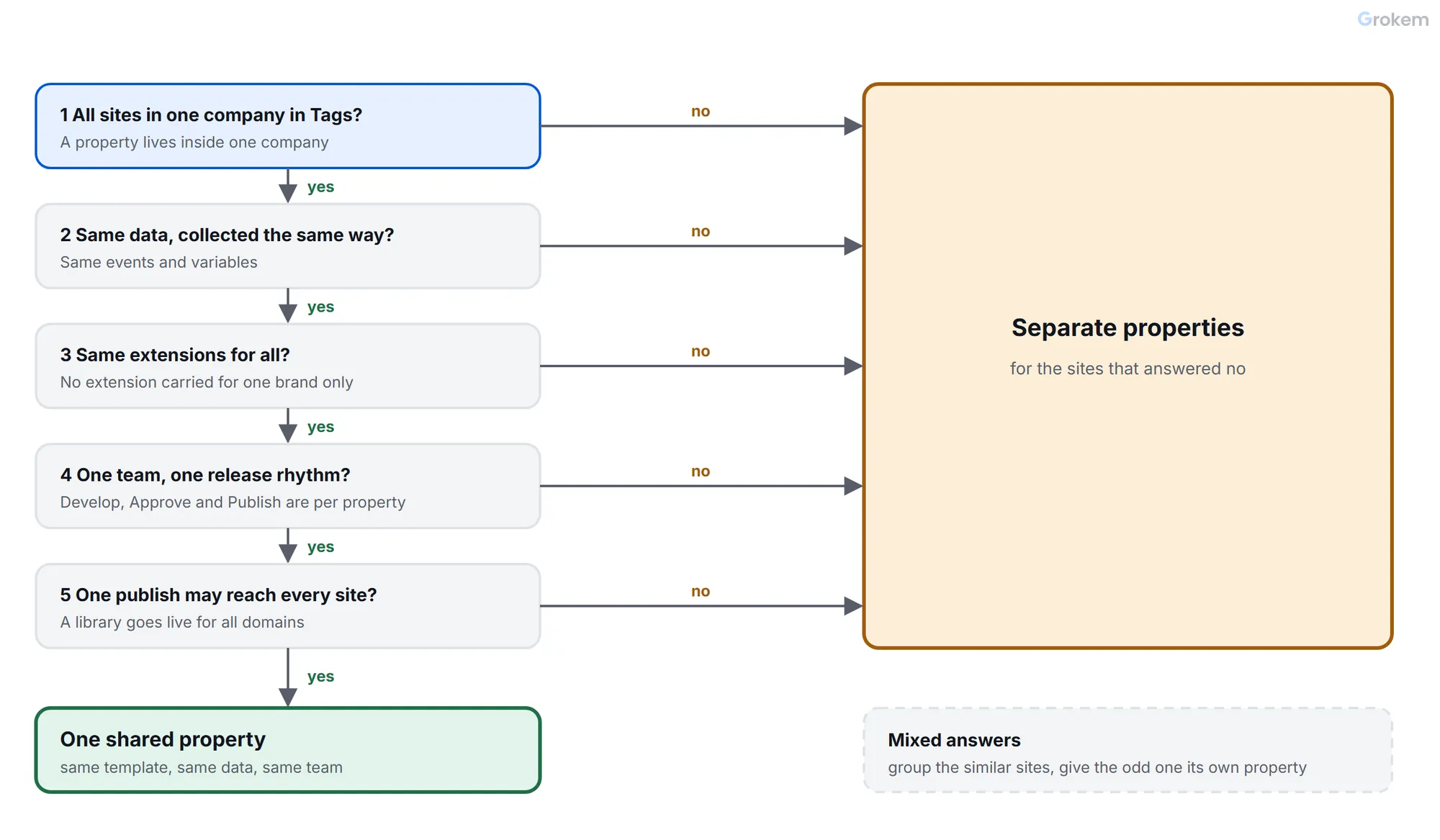
Answer the questions in order and stop at the first "no".
- Are all the sites in one Experience Cloud organization and one company in Tags? If not, they need separate properties.
- Do they collect the same data in the same way? If not, separate.
- Do they need the same extensions? If not, separate.
- Is one team releasing for all of them, at one rhythm? If not, separate.
- Can the whole group live with one publish reaching every site? If not, separate.
- If all answers were yes: one shared property.
When the answers split (for example, two similar sites and one very different one), group the similar ones and give the odd one its own property.
Examples
| Situation | Choice | Why |
|---|---|---|
| Five regional sites, one CMS template, one team | One property | Same data and rules, one release |
| Two brands with different analytics stacks | Two properties | Different extensions and report suites |
| A new acquisition that has its own Experience Cloud organization | Its own property, in its own company | A property serves one organization |
| A shop and its help centre, one team, different data | Start shared; split if the rules diverge | Cheap now; copy the rules later with care |
| A partner microsite you do not control | Its own property | Its releases and risks are separate |
For brands that must share one set of data, the report suites can still be separated with multi-suite tagging and the multi-brand setup shows a full example.
Moving from one property to several
- List the rules, data elements and extensions each brand actually uses. The audit gives you the inventory.
- Create the new property in the right company, with the same environments.
- Copy the rules; the extensions they need come with them. Copy the data elements they depend on as a separate step.
- Recreate what is not copied: the environments, libraries and adapters, plus the user permissions.
- Test on the new property's Development environment, then Staging, before changing a single embed code on a live site.
- Change the embed code site by site. Do not leave the embed codes of two properties on one page.
- Remove the brand's rules from the old property only after the new one has run in production and the beacons match.
Moving from several to one
This is harder. The rules have drifted, so merging means choosing one version of every rule and every data element, and the sites must agree on a shared data layer. Do it only when the data collection really is the same, and plan it as a project, not as a clean-up.
What we compared
- Data collected
- Extensions
- Report suites
- Release cadence
- Blast radius of a publish
- Permissions
- Maintenance
- Consistency
Recommendation
Share one property when the sites run on the same platform or template, collect the same data, use the same extensions and are released by the same team: Adobe's own guidance is to group such sites to avoid duplicating rules. Give a brand its own property when it needs unique data collection, its own extensions, its own release rhythm or its own people, and always when it belongs to a different company in Tags. When the answers are mixed, group the similar sites and give the odd one its own property. If you choose separate properties, decide up front how a fix reaches all of them, because a copy has no ongoing link to the original.
Caveats
- Adobe's planning guidance is short; the criteria table and the decision path are an interpretation of it, not an Adobe rule.
- That two properties cannot share a page comes from community answers, including one from an Adobe employee, and not from the documentation read for this guide.
- The Analytics extension's page does not mention a second copy in one property; the advice to plan for one is a reading of that silence.
- Which brands may share data is a decision for your own privacy and legal teams, which this guide does not make for you.
Frequently asked questions
Can one Tags property serve several domains?
Yes. A web property has one embed code and can cover one or more domains and subdomains. Adobe says to apply one property to multiple domains when the sites share a template and you want to track the same assets on all of them.
Can I put two Tags properties on one page?
Community answers, including one from an Adobe employee, say this is not supported because the properties would conflict over the same `_satellite` object. Adobe's documentation read for this guide does not address it, so plan around it.
If I copy a property, will the copies stay in sync?
No. A copy is a one-time action with no ongoing relationship to the original. Changes to one are not reflected in the other.
What does copying a property leave behind?
Adapters, environments and libraries are not copied. Rules, data elements, extensions and property settings are. A rule copied alone brings the extensions it needs but not the data elements it uses.
Who can publish in a shared property?
Whoever holds the Publish right in that property. Develop, Approve and Publish are granted per property and are not inclusive, so anyone with Publish in a shared property can publish for every site in it.
References
From Grokem: https://www.grokem.com/data/data-analytics/tag-management/one-adobe-launch-property-or-one-per-brand-how-to-choose